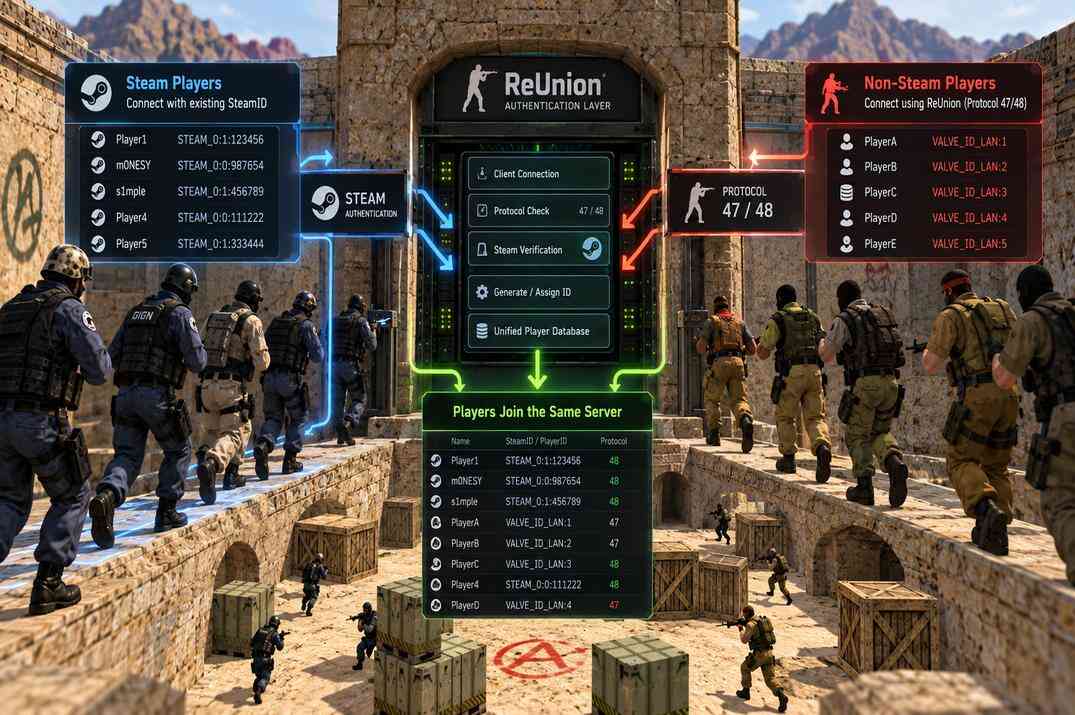
ReUnion authentication system allowing Steam and non-Steam players using protocols 47 and 48 to join the same Counter-Strike 1.6 server

How to Install ReUnion on a CS 1.6 Server for non-Steam Clients

Letting non-Steam players in, how each of them gets a SteamID, and the one setting that must not be lost

A clean ReHLDS server accepts Steam clients only. A large part of the CS 1.6 audience plays on non-Steam builds, and for them the server simply does not exist until you install ReUnion, the Metamod-R module that authenticates those clients and gives each of them a stable SteamID that bans, admin rights and statistics can hang on.

Part of the CS 1.6 server cluster. It assumes the server from the base guide with ReHLDS and Metamod-R installed. Paths assume /home/cs16/cs16srv/cstrike/, files go up through WinSCP.

What ReUnion Does

ReUnion is a module for Metamod-R that lets non-Steam clients on protocols 47 and 48 connect to a ReHLDS-based server. It is the successor of DProto, from the same ReHLDS team, and it does two jobs at once.

The first is authentication. Steam clients bring a real SteamID from Valve. A non-Steam client has no such thing, so ReUnion works out what kind of client it is talking to - which emulator, which protocol - and assigns it a SteamID by one of several methods: generated from the client's hardware, generated from its IP, or rejected outright. That ID is what the rest of the server sees: AMX Mod X admin flags, banid, statistics plugins all key on it.

The second is server queries. ReUnion answers server-browser requests in the format monitoring sites and old clients expect, fixes a hang some clients have on connect, and rate-limits query floods, which on a public 1.6 server is a daily thing.

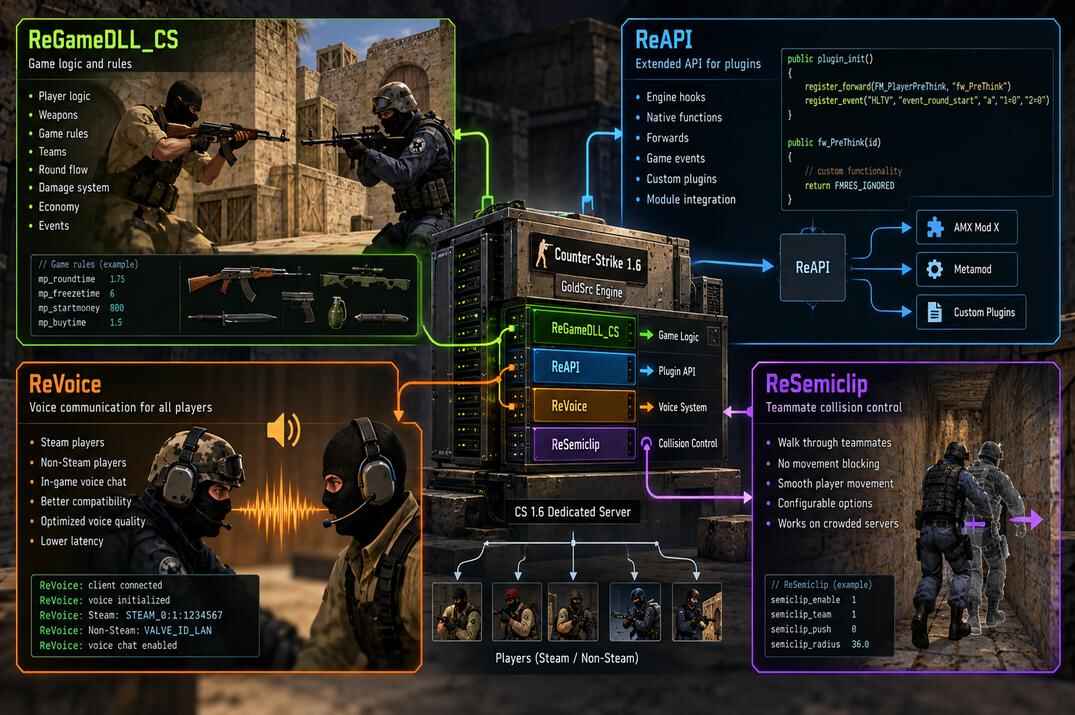
Two things it does not do. It does not make Steam players talk to non-Steam ones - that is ReVoice, covered with the other Re* modules, and it needs ReUnion loaded first. And it does not check client files or catch cheats; for that there is ReChecker and the anticheat stack.

Installing ReUnion

Where to Get It

Files and the Module List

  1. Stop the server, download the latest release and unpack it.
  2. Copy the archive's addons/ folder and the reunion.cfg file into the server's cstrike/ folder, merging with what is there. The config sits next to server.cfg , not inside addons/ .
  3. Open cstrike/addons/metamod/plugins.ini and add ReUnion as the first line , above AMX Mod X. It has to load before everything that depends on client IDs.
  4. Optional: delete addons/reunion/reunion_mm.dll, it is the Windows build.
Copying the Reunion addons folder and configuration file to the CS 1.6 server with WinSCP
Copy the addons folder and reunion.cfg into the server's cstrike directory
Editing Metamod plugins.ini to load Reunion on a CS 1.6 Linux server
Add the Reunion Linux library path to Metamod's plugins.ini file
linux addons/reunion/reunion_mm_i386.so
linux addons/amxmodx/dlls/amxmodx_mm_i386.so

Do not start the server yet. With the stock reunion.cfg it will not load - one value has to be filled in first.

SteamIdHashSalt: the Setting You Must Not Lose

Open cstrike/reunion.cfg, find SteamIdHashSalt and set a random string, latin letters and digits, at least 32 characters. The file says 16 is the minimum and 32 the recommendation; take 32 or more.

SteamIdHashSalt = "7Qm9X25PkL5vN8pR4tY6cD1fH3jS0wB7zA"

Do not copy this one, generate your own. Every SteamID ReUnion hands to a non-Steam client is a hash of the client's data and this salt. That is what stops one player from stealing another's ID (and with it their admin flags) by faking the data: without your salt they cannot reproduce the hash. With AuthVersion 3 or 4, which is every current install, an empty salt means ReUnion refuses to start and shows up in meta list as fail load. Writing 0 disables hashing; the file itself calls that not recommended, and I agree.

The flip side: the salt is part of your players' identity. Change it, and every non-Steam player on the server gets a different SteamID the next time they connect. Admin entries in users.ini, bans, ranks in statistics plugins - all of it points at IDs that no longer exist. Back the salt up together with the server and never regenerate it on a live server.

Now start the server and type meta list:

Reunion   RUN   reunion_mm_i386.so   v0.2.0.34   ini   Start Never
Metamod plugin list showing Reunion running on a CS 1.6 Linux server
Run meta list and confirm that Reunion has the RUN status

Your version number may differ. RUN means non-Steam clients can connect right now, with the default ID rules described next.

How non-Steam Clients Get a SteamID

This is the part of reunion.cfg worth understanding, because it decides who gets in and what the server calls them. ReUnion recognises the client type - real Steam, one of the emulators (revEmu, SteamClient 2009, SteamEmu, AVSMP), a scanner, HLTV, or an old client with no ID generation at all - and for each type a cid_* option says which kind of ID to assign.

cid value What the client gets When it makes sense
1 STEAM_x:x:x, real or generated from the client's hardware Default for Steam and every modern emulator. Stable per player, survives IP changes.
2 VALVE_x:x:x, same source, old prefix Only if some plugin insists on VALVE_ IDs. Rare today.
3 STEAM_x:x:x generated from the IP address Clients that cannot generate an ID. Changes with the IP, so bans and admin rights by ID are unreliable.
4 VALVE_x:x:x generated from the IP address Same as 3 with the old prefix.
5 Rejected, the client cannot connect Default for HLTV, pending Steam and clients with no ID generation.
8 / 10 STEAM_ID_LAN / VALVE_ID_LAN LAN servers only.
9 / 11 STEAM_ID_PENDING / VALVE_ID_PENDING Lets the client in with no usable ID. Avoid on a public server.
12 STEAM_666:88:666 One shared ID for everyone of that type. Debugging only.

The Defaults and What to Change

The stock file is already a sensible public-server setup:

cid_Steam = 1
cid_SteamPending = 5
cid_HLTV = 5
cid_NoSteam47 = 5
cid_NoSteam48 = 5
cid_RevEmu = 1
cid_RevEmu2013 = 1
cid_SC2009 = 1
cid_OldRevEmu = 1
cid_SteamEmu = 1
cid_AVSMP = 1
cid_Setti = 3
cid_SXEI = 1

AuthVersion = 4
IDClientsLimit = 1
Emulators = 1
Every current non-Steam build (revEmu, RevEmu 2013, SteamClient 2009, SteamEmu, AVSMP, sXeI) gets a hardware-based STEAM_ ID. This is what makes bans and admin rights work for non-Steam players. Leave it.
cid_NoSteam47 / 48 = 5
Ancient clients that cannot generate any ID are rejected. Set 3 to let them in with an IP-based ID if your audience still has such builds; expect their ID to change with their IP.
cid_HLTV = 5
HLTV proxies are refused unless they come from HLTVExcept_IP (default 127.0.0.1). Running your own HLTV elsewhere: put its IP there instead of opening cid_HLTV.
AuthVersion = 4
The current ID scheme. 1 is DProto, 2 and 3 are older ReUnion. Changing it on a live server changes every non-Steam ID, same effect as changing the salt. New server: leave 4.
IDClientsLimit = 1
One connection per SteamID. Raise it only for testing with several clients from one machine; 0 removes the limit.

The *_Prefix1 / IPGen_Prefix block further down the file is ignored with AuthVersion above 2, so there is nothing to set there. Note the file's own remark: banid uses the SteamID without any prefix.

Checking What a Player Got

In the server console status lists everyone online with their SteamID. A Steam player shows the real STEAM_0:x:xxxxxxx, a non-Steam one shows the ID ReUnion generated - it looks the same, and that is the point. To see how ReUnion classified each connection, turn logging on while you test:

LoggingMode = 1
// 0 none, 1 console, 2 log files, 3 both. Back to 0 when done

Any player's ID can be checked against the real thing with the SteamID Lookup tool: a generated ID resolves to no Steam profile, a real one does.

Server Queries and Flood Limits

The second half of reunion.cfg is about how the server answers the outside world. The defaults are right for a public server; this is what they mean so you know when to touch them.

ServerInfoAnswerType = 0
Answer format for server-info requests. 0 is the Steam format and the one to keep. 1 is the old GoldSrc style, 2 sends both, three packets per request, for monitorings that only understand the old one.
FixBuggedQuery = 1
Works around clients with a broken server browser that hang on connect. Leave on.
EnableQueryLimiter = 1
Rate-limits info and player queries. QueryFloodBanLevel (default 400 per second; the highest legit level measured is about 80) is where an IP gets banned for QueryFloodBanTime minutes (default 10, 0 = block without banning). Set the limiter to 0 only if DDoS protection in front of the server already does this.
[QueryLimiterExceptIP]
IPs the limiter ignores, one per line. Put your monitoring or server-stats checker here if it polls often.
AllowSplitPackets = 0
Splitting answers larger than 1400 bytes. Off, because some monitorings cannot reassemble them.

Once the server is public, CS 1.6 Server Info shows what the outside world sees when it queries you: name, map, players, cvars and the modules it can detect. And Steam Server Stats will pick the server up from the master list and start a player history for it.

What's Next

Non-Steam players are in and each has a stable ID. The next thing they will notice is that Steam and non-Steam cannot hear each other in voice - that is ReVoice, and it loads right after ReUnion. After that, the only thing standing between a new player and your custom maps is download speed.
ReUnion FAQ

meta list shows Reunion as fail load. Why?

Almost always an empty or too short SteamIdHashSalt. With AuthVersion 3 or 4 ReUnion refuses to start without it. Set a 32+ character string of latin letters and digits and restart. The second cause is a wrong path in metamod/plugins.ini.

Does ReUnion affect Steam players?

No. Steam clients keep their real SteamID (cid_Steam = 1) and authenticate through Steam as before. ReUnion only decides what to do with everyone else.

Can I change the salt later?

You can, but every non-Steam player gets a new SteamID on their next connect, and admin entries, bans and stats tied to the old IDs stop matching. Treat the salt like a password you set once and back up. The same applies to changing AuthVersion.

A non-Steam player cannot connect at all.

Their client type is set to 5. Most often it is an old build with no ID generation, which falls under cid_NoSteam47 or cid_NoSteam48. Set that to 3 to let such clients in with an IP-based ID, and turn LoggingMode on to see how ReUnion classified them.

Why can Steam and non-Steam players not hear each other?

Different voice codecs. ReUnion does not bridge voice; ReVoice does, and it must be listed in metamod/plugins.ini right after ReUnion.

Is a generated SteamID unique?

For hardware-based types (cid 1) it is stable per client and practically unique, hashed with your salt. For IP-based types (cid 3) it is unique per IP, so two players behind one router share it and one player on a new IP becomes someone else. That is why 1 is the default for emulators and 3 only a fallback.

More CS 1.6 Guides

Guide

open →

Leave a Reply

Your email address will not be published. Required fields are marked *