CS 1.6 Buy Binds Guide - All Buy Commands
Weapons, armor and grenades on one key
Buy binds let you buy a full loadout in CS 1.6 with a single key. Instead of opening the buy menu and clicking through categories every round, you press one button and the game grabs your weapon, armor, ammo and nades in one go.
In 1.6 this saves real time. The buy menu is slow, and on pistol or eco rounds those couple of seconds matter - you want to be in position, not still stuck in a menu when the round starts. Once your binds are set, buying stops being something you think about.
There's also a case where binds go from handy to just about essential. A lot of servers today run a single map, usually Dust2 (de_dust2), and to keep the pace up admins set mp_freezetime 0 - no freeze time at all. The round starts the moment you spawn, and it's a race for the key spots - mid, the doors to long, a fast hit onto B. One key press and you're fully geared and already moving, instead of buying piece by piece.
What Are Buy Binds in CS 1.6
A bind is a console command that ties an action to a key. You tell the game "when I press this key, run this command", and it does. Binds aren't scripts or cheats - they're a normal built-in feature, and they work on every server, from your local game to any public or league server.
A buy bind is just that idea pointed at buying. One key, one purchase. It can be a single item or a whole loadout stacked into one line.
Why Use Buy Binds in CS 1.6

buy command by default
The menu works - every 1.6 player has the classic combos burned into muscle memory, like B-4-2; B-6 or B-4-3; B-6 - but it's slow, and it's easy to misclick. Half a second of hesitation and you're buying something when the round's already live.
It matters even more on the many single-map servers running mp_freezetime 0. With no freeze time the round is a sprint for position from the first second - grab mid and long doors on Dust2 and you're halfway to the round win. But you need a gun and gear to contest those spots.
A bind fixes that. It hands you the whole loadout in one press, so you lose a fraction of a second and you're off rushing, while the guy still tapping through the menu is already behind. Set one key for your full rifle buy, one for a pistol round, one for eco, and you're done - the same purchase, round after round, without looking at the menu.
How CS 1.6 Buy Commands Work
Buying in CS 1.6 doesn't need the menu at all. Every weapon and item has its own console command, and typing that command buys it directly - as long as you're in the buy zone during buy time and have the money. ak47 buys an AK-47, awp buys an AWP, deagle buys a Desert Eagle. That's the whole system, and it's what makes binds so simple: you put those commands on a key. If you want the full picture of how bind, alias and wait fit together, that's in Scripting in CS 1.6, and ready-made scripts beyond buying are in Useful CS 1.6 Scripts.
Single-Item Buy Bind
The syntax:
bind "key" "command"
So, to put an AK-47 (ak47) on the C key:
bind "c" "ak47"
Press C in the buy zone and you buy an AK, provided you can afford it. If you can't, nothing happens - the game just ignores it. One key, one item, that's the whole thing.
Multiple Buys in One Bind
You're not limited to one item per key. Chain several commands with a semicolon between them and they all run on the same press:
bind "c" "ak47; vesthelm; hegren"
Press C and the game buys an AK, then Kevlar with a helmet, then an HE grenade - in that order. It runs down the list and buys what you can afford, skipping anything that's too expensive or unavailable.
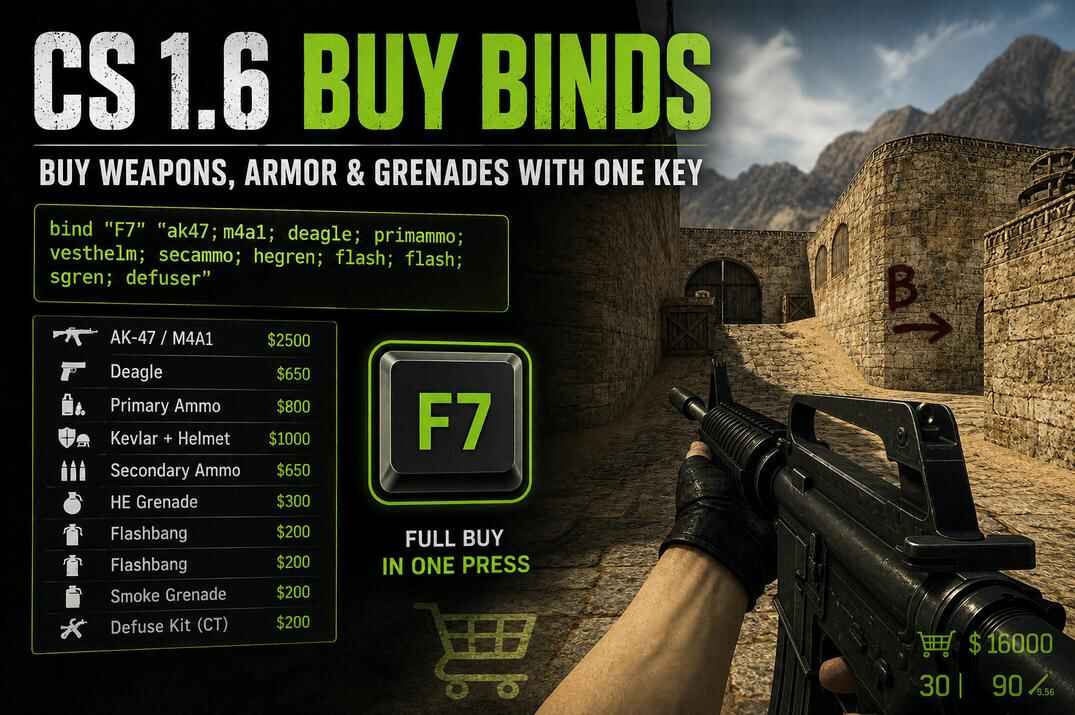
This is where binds get useful. A single line can hold your primary, your pistol, armor, ammo and all your nades. Here's a full rifle buy on one key:
bind "F7" "ak47; m4a1; deagle; primammo; vesthelm; secammo; hegren; flash; flash; sgren; defuser"
A few things in that line are specific to 1.6:
-
ak47; m4a1on one line covers both sides. On T you can't buy an M4 and on CT you can't buy an AK, so the game buys whichever one fits your side and ignores the other. One bind works for T and CT . primammoandsecammofill the spare ammo for your primary and your pistol. Buying a gun alone doesn't do that.flashtwice buys two flashbangs. Same for any item you can carry more than one of.defuseronly works on CT. On T it's ignored, so you can leave it in a shared bind.
Ready-to-Use CS 1.6 Buy Binds
Here's a set of ready binds you can drop straight into your config or console. They're grouped by round type - armor and nades, pistol and eco, SMGs, rifles, AWP, and a full buy. Take what fits your playstyle, change the keys any way you like, and drop the items you never buy. I use F-keys for mine, but any free key works.
Armor and Utility Buy Binds
Sometimes you just want armor and nades on their own key - handy on rounds where you keep a weapon from last round and only need to top up.
bind "F1" "vesthelm; defuser"
Kevlar with helmet, plus a defuse kit on CT. On T the defuser is simply ignored.
bind "F2" "vesthelm; hegren; flash; flash; sgren; defuser"
Full armor and a complete nade set - HE, two flashes and a smoke - plus a defuser on CT. A good "gear up" key when your gun's already sorted.
Deagle Buy Binds
On pistol rounds and ecos you're spending light, usually a better pistol and a bit of armor.
bind "F3" "deagle; secammo; vesthelm"
A Deagle with full reserve ammo and Kevlar with helmet.
bind "F4" "deagle; secammo"
Just the Deagle and ammo, no armor - for a proper eco when you're saving every dollar.
SMG and Budget Buy Binds
When you've got some money but not enough for a rifle, an SMG is the go-to. They're cheap, and they'll carry a force-buy round.
bind "F5" "mp5; primammo; vesthelm; defuser"
An MP5 with full ammo and armor. Reliable and easy on the wallet.
bind "F6" "p90; primammo; vesthelm; secammo; defuser"
A P90 setup with armor and pistol ammo topped up - a bit pricier but hits harder on a force buy.
Rifle Buy Binds
The bread-and-butter buy. This one covers both sides in a single key.
bind "F7" "ak47; m4a1; primammo; vesthelm; defuser"
On T you get an AK-47, on CT an M4A1 - the game picks the right one for your side. Then full ammo for it, Kevlar with helmet, and a defuser on CT. No pistol and no nades here, that's what F2 is for; if you'd rather have everything on one key, the full buy below does that.
If you want a cheaper rifle round, the Galil (T) and Famas (CT) work the same way:
bind "F8" "galil; famas; primammo; vesthelm; defuser"
AWP Buy Binds
For AWP rounds you want the rifle, a solid pistol to back it up, and your usual armor.
bind "F9" "awp; primammo; deagle; secammo; vesthelm; defuser"
An AWP with full ammo, a Deagle with reserve, Kevlar with helmet, and a defuser on CT.
Full Buy Loadout
If you'd rather run one key for your standard full buy and not think about it, this is it - the one I keep bound myself.
bind "F10" "ak47; m4a1; deagle; primammo; vesthelm; secammo; hegren; flash; flash; sgren; defuser"
It buys from left to right and skips anything you can't afford, so the order you write the commands in is the order they get priority. In this bind the Deagle and primary ammo come before armor, which means on a short round the money can run out before it reaches vesthelm - you'd get the rifle but no Kevlar. If armor matters more to you than a second pistol, move it up front:
bind "F10" "ak47; m4a1; primammo; vesthelm; deagle; secammo; hegren; flash; flash; sgren; defuser"
Now Kevlar gets bought right after the rifle, so it's far more likely to make the cut when cash is tight. Treat these binds as templates - put the items you care about most on the left, and cut anything you don't use.
Build Your Own Buy Bind
Pick a key and tick what you want in the line. The bind and its price update as you go, Copy puts it on the clipboard.
bind "F7" "ak47; m4a1; primammo; vesthelm; deagle; secammo; hegren; flash; flash; sgren; defuser"
Armor goes right after the rifle so it survives a short wallet. Prices are without ammo, which depends on the gun.
CS 1.6 Buy Command Cheat Sheet
Every weapon and item in CS 1.6 has its own buy command, and these are the ones you drop into your binds. The tables below group them by type - primaries, pistols, grenades and equipment - so you can grab the exact command name without second-guessing the spelling. Where two names are listed, both work; the short one is what you'll see in most configs.
CS 1.6 Primary Weapon Buy Commands
Rifles, snipers, SMGs and shotguns - the main gun you build a buy around. Some are side-locked: the AK-47 is Terrorist-only and the M4A1 is Counter-Terrorist-only, which is exactly why ak47; m4a1 on one key works for both teams.
| Buy Command | Weapon | Team | Price |
|---|---|---|---|
ak47 |
AK-47 | T only | $2500 |
m4a1 |
M4A1 | CT only | $3100 |
awp |
AWP | Both | $4750 |
scout |
Scout | Both | $2750 |
aug |
AUG | CT only | $3500 |
sg552 |
SG552 | T only | $3500 |
famas |
FAMAS | CT only | $2250 |
galil |
Galil | T only | $2000 |
g3sg1 |
G3SG1 | T only | $5000 |
sg550 |
SG550 | CT only | $4200 |
p90 |
P90 | Both | $2350 |
mp5 / mp5navy |
MP5 Navy | Both | $1500 |
tmp |
TMP | CT only | $1250 |
mac10 |
MAC-10 | T only | $1400 |
ump45 |
UMP45 | Both | $1700 |
m3 |
M3 Shotgun | Both | $1700 |
xm1014 |
XM1014 | Both | $3000 |
m249 |
M249 | Both | $5750 |
CS 1.6 Secondary Weapon Buy Commands
Your sidearm, and on pistol and eco rounds the star of the show. The Deagle is the usual pick for a strong pistol buy, while the cheaper ones come in handy when you're saving every dollar.
| Buy Command | Weapon | Team | Price |
|---|---|---|---|
deagle |
Desert Eagle | Both | $650 |
usp |
USP | CT only | $500 |
glock |
Glock-18 | T only | $400 |
p228 |
P228 | Both | $600 |
elites |
Dual Elites | T only | $800 |
fn57 / fiveseven |
Five-SeveN | CT only | $750 |
CS 1.6 Grenade Buy Commands
Grenades are bought one command at a time, and you can stack them in a bind by repeating the command - flash; flash buys two flashbangs. Each nade has its own name, so add whichever ones fit your setup.
| Buy Command | Grenade | Price |
|---|---|---|
hegren / hegrenade |
HE Grenade | $300 |
flash / flashbang |
Flashbang | $200 |
sgren / smokegrenade |
Smoke Grenade | $300 |
CS 1.6 Equipment Buy Commands
Armor, the defuse kit, and the ammo commands. Two of these are easy to forget but matter a lot: primammo and secammo refill your spare ammo, and defuser only does anything on the CT side. The tactical shield is in the game too, but most servers have it disabled.
| Buy Command | Item | Price |
|---|---|---|
vest |
Kevlar | $650 |
vesthelm |
Kevlar + Helmet | $1000 |
primammo |
Primary ammo, full reserve | by clip |
secammo |
Pistol ammo, full reserve | by clip |
defuser |
Defuse Kit (CT only) | $200 |
nvgs |
Night Vision Goggles | $1250 |
shield |
Tactical Shield (CT only) | $2200 |
Saving Your Binds: Console vs config.cfg vs userconfig.cfg
There are a few places a buy bind can go, and the difference is just where it gets stored. Once you know which is which, you won't run into the classic problem of binds disappearing after a restart.
- Console
- The fastest way to add a bind. Open it, type the line, and it works right away. By default the game saves the bind into config.cfg when you exit, overwriting whatever was on that key before. If you've made config.cfg read-only, the bind lives only for that session. Either way, the console is the place to try a bind before you put it in userconfig.cfg for good.
- config.cfg
- The game's own settings file. It holds everything you change through the menus, and the game rewrites it every time you exit. Binds you add here by hand can get wiped on the next save. Valve even leaves a note at the top of the file pointing you somewhere else: // Add custom configurations to the file "userconfig.cfg"
- userconfig.cfg
- Where your personal stuff lives: binds, scripts, aliases, custom commands. The game never overwrites it. It isn't there by default, but config.cfg already ends with exec userconfig.cfg , so the moment you create the file it loads on every launch.
So: test in the console, keep everything in userconfig.cfg, and don't touch config.cfg. The full breakdown of the file load order is in the CS 1.6 Config Guide.
Adding Binds Through the Console
This is the fastest way to test a bind before you commit it to a file.
- Start a game on a local server.
-
Open the console with the tilde
~
key. If it doesn't open, the bind for it was probably changed; it should be in your config.cfg as
bind "~" "toggleconsole". You can also force the console with the-consolelaunch option , though on a normal setup you won't need it. - Type your bind and press Enter, for example
bind "F7" "ak47; m4a1". - Close the console and test the key during buy time.
If something's off - wrong key, missing item - edit the line and enter it again.
Saving Binds in userconfig.cfg
The userconfig.cfg file is where your binds go to stay. The game never overwrites it, and because config.cfg already calls exec userconfig.cfg, everything inside loads on every launch.
- Open your \cstrike\ folder (the same place config.cfg lives).
- If you don't have a userconfig.cfg yet, create one with any text editor.
- Add each bind on its own line and save the file.
- Launch CS 1.6 and check the binds on a local server.
bind "F5" "deagle; secammo; vesthelm; hegren; flash; flash; sgren; defuser"
bind "F6" "ak47; m4a1; primammo; vesthelm; deagle; secammo; hegren; flash; flash; sgren; defuser"
bind "F7" "awp; primammo; deagle; secammo; vesthelm; hegren; flash; flash; sgren; defuser"
The file can also be loaded by hand from the console with exec userconfig.cfg, and the changes apply on the spot. Note the .cfg at the end - in 1.6 the extension is required, unlike CS2.
A smart move is to set config.cfg to read-only in Windows. That way, if a bind or command ever causes trouble, you get things working again in seconds by cleaning up userconfig.cfg.
CS 1.6 Buy Bind Tips and Troubleshooting
Buying a gun doesn't fill its spare ammo. You need primammo for your primary and secammo for your pistol. One call tops them right up, so ak47; primammo gets you the rifle with a full reserve. Leave these out and you spawn with just the mag that's in the gun.
T and CT can't buy each other's rifles, so ak47; m4a1 on the same key buys whichever fits your side. Same trick works for galil; famas. No need for separate T and CT binds.
F-keys are the usual choice, but the numpad works too and keeps your setup out of the way. KP_END, KP_5 or KP_INS are easy to reach and rarely used for anything else. Pick what your fingers land on naturally.
Before you trust a bind in a real match, spin up a local game and press the key during buy time. Check that it buys what you want on both T and CT - especially the long full-buy lines, where one misspelled command quietly skips an item.
A bind only fires while you're standing inside a buy zone during buy time. Press it after you've left the zone or after buy time ends and nothing happens - that's the server settings, not a broken bind.
The game buys left to right and skips what you can't afford. Put the items you care about most first - the rifle, then armor - so a short wallet cuts the nades, not the Kevlar.
Conclusion
Buy binds are one of those small setups that quietly make CS 1.6 better every round. Instead of digging through the menu, you press one key and spawn with your gun, armor, ammo and nades ready to go. On the many servers running mp_freezetime 0, that speed is the difference between grabbing a key position and starting the round a step behind.
Start with a few binds you'll actually use - a full rifle buy, a pistol round, maybe an eco - and put them in userconfig.cfg so they load every time. Test them on a local server, tweak the keys and items to fit how you play, and leave config.cfg alone. Once it's set, buying stops being something you think about, and you can spend those first seconds on the game instead of the menu.
CS 1.6 Buy Binds FAQ
Are buy binds allowed on CS 1.6 servers?
Yes. Buy binds are built-in console commands, not scripts or cheats, and they work on every server - public, league or LAN.
Why isn't my buy bind buying anything?
Most of the time it's the buy zone or buy time. A bind only fires while you're inside a buy zone during the buy window - step out or wait too long and nothing happens. If you're in the zone and it still doesn't work, check that you can afford the items and that the command names are spelled right.
Why does my bind buy the gun but no ammo?
Because buying a weapon doesn't include spare ammo. Add primammo for your primary and secammo for your pistol, and one press fills the reserve completely.
Should I put my binds in config.cfg or userconfig.cfg?
userconfig.cfg. The game rewrites config.cfg every time you exit, so binds you add there by hand can get erased. userconfig.cfg is never overwritten, and it loads automatically because config.cfg ends with exec userconfig.cfg.
Can I use one bind for both T and CT?
Yes. Since you can't buy the other team's rifles, list both on one key - ak47; m4a1 - and the game buys whichever fits your side. The other one is skipped.
Can I use numpad or mouse keys for buy binds?
Any key the game recognizes works, including numpad keys and extra mouse buttons (mouse3, mouse4, mouse5). F-keys are the common choice, but pick whatever's comfortable and away from your movement keys.
How do I remove a buy bind?
Type unbind followed by the key in the console - for example unbind f7. If you saved the bind in userconfig.cfg, delete that line too, otherwise it comes back the next time the file loads.