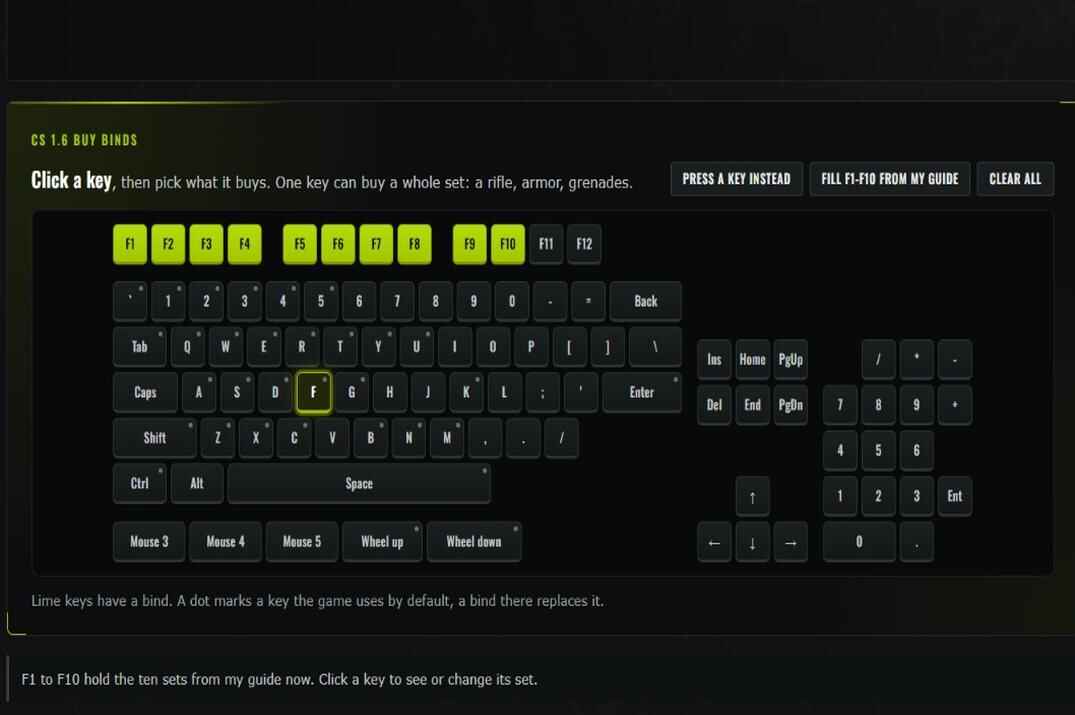
CS 1.6 Buy Binds Generator with an interactive keyboard, assigned keys, and ready-made buy bind presets

CS 1.6 Buy Binds Generator

Click a key, pick what it buys, copy the lines into your config

A buy bind is one key that buys a whole set: a rifle, armor, grenades. No menu, no clicking through it while the round starts. Below is a keyboard: click a key, pick the things, and the page writes the bind lines ready for your config.

It is made for Counter-Strike 1.6. You don't have to remember a single command or how the game calls a key. If you'd rather know them, they are all in my buy binds guide.

CS 1.6 buy binds

Click a key, then pick what it buys. One key can buy a whole set: a rifle, armor, grenades.

Lime keys have a bind. A dot marks a key the game uses by default, a bind there replaces it.

Your binds

  1. Open Steam\steamapps\common\Half-Life\cstrike.
  2. If there is a userconfig.cfg already, open it in Notepad and paste the lines at the end. If there is none, put the downloaded file there.
  3. Start the game. The binds work in a buy zone during buy time.

Don't put binds into config.cfg by hand: the game rewrites that file on every exit. All commands and more ready sets are in my buy binds guide.

I have binds already: read them

Paste lines from your config.cfg or userconfig.cfg. I take the buy binds out of them and put them on the keyboard. Everything else is left alone.

How to Make Buy Binds for CS 1.6

From an empty keyboard to working binds in a few steps

CS 1.6 Buy Binds Generator with an interactive keyboard, assigned keys, and ready-made buy bind presets
Interactive keyboard for creating and managing CS 1.6 buy binds
  1. Click a key on the keyboard at the top of the page. Or press Press a key instead and hit the key on your real keyboard.
  2. Pick what the key buys: weapons, armor, grenades, ammo. Each thing you click goes into the list on the right.
  3. Check the order. The game buys from the first to the last and skips what you can't afford, so the most important goes first. The arrows move a thing earlier or later, the cross takes it out.
  4. Do the same for the other keys. Keys with a bind turn lime.
  5. Press Copy or Download userconfig.cfg in the Your binds block and put the lines into the game, see Into the Game.

Under the list the page shows what the set costs for CT and for T. The two numbers differ because some things are sold to one side only: a defuse kit is for CT, an AK-47 for T. Ammo is not in the number, its price depends on the gun.

The page remembers your binds in this browser. Come back later and the keyboard is the way you left it. Clear all empties it.

If you already have binds, open (click) I have binds already: read them, paste the lines from your config.cfg or userconfig.cfg and press Read my binds. The buy binds land on the keyboard and you can change them there.

Ready Buy Sets for CS 1.6

Ten sets for every kind of round, on F1 to F10 in one click

Don't want to build every key by hand? Fill F1-F10 from my guide puts ten sets on the F keys at once. These are the sets I play with. Any of them can also go on any other key: pick the key and click the set under Ready sets.

Key Set What the bind holds When
F1 Armor vesthelm; defuser Armor on a round where you keep your gun
F2 Armor + grenades vesthelm; hegren; flash; flash; sgren; defuser Everything but the gun
F3 Deagle + armor deagle; secammo; vesthelm A strong pistol round
F4 Deagle deagle; secammo A cheap round, money saved for the next
F5 MP5 mp5; primammo; vesthelm; defuser The round after a won pistol round
F6 P90 p90; primammo; vesthelm; secammo; defuser Same idea, more bullets
F7 AK / M4 ak47; m4a1; primammo; vesthelm; defuser The normal rifle round
F8 Galil / FAMAS galil; famas; primammo; vesthelm; defuser A rifle when money is short
F9 AWP awp; primammo; deagle; secammo; vesthelm; defuser The sniper round
F10 Full buy ak47; m4a1; primammo; vesthelm; deagle; secammo; hegren; flash; flash; sgren; defuser Everything, when the money allows it

Two rifles in one bind is not a mistake. ak47; m4a1 buys the AK when you play T and the M4 when you play CT: the game skips the gun your side can't buy. The same goes for galil; famas and for the defuser at the end, a T just doesn't get it.

After a fill, click any F key and change its set the way you like: take the smoke out, put a second flashbang in, swap the P90 for a UMP45.

Which Keys to Use for Buy Binds

Free keys, taken keys and the number pad

A key holds one bind. Put a buy bind on R and it stops reloading. That's why the keyboard marks with a dot every key the game uses out of the box. Hover over it to see what it does. You can still take such a key, the page only wants you to know.

Number pad
The classic place for buy binds: free by default and right under the mouse hand. The game has odd names for these keys, KP_END for 1, KP_INS for 0. The page writes them for you.
F1 to F12
Close to the left hand, good for a laptop without a number pad. The ten ready sets go here.
Mouse buttons
Mouse 4 and Mouse 5 are the side buttons. One of them with armor on it saves a second every round.
Letters around WASD
Fast to reach, but most are taken: radio, chat, night vision. Take one only if you don't use what's on it.

A set is limited: one of each thing and two flashbangs, that's all a player can carry. The page doesn't let you add more.

Adding Buy Binds to CS 1.6

Where the lines go so the game keeps them
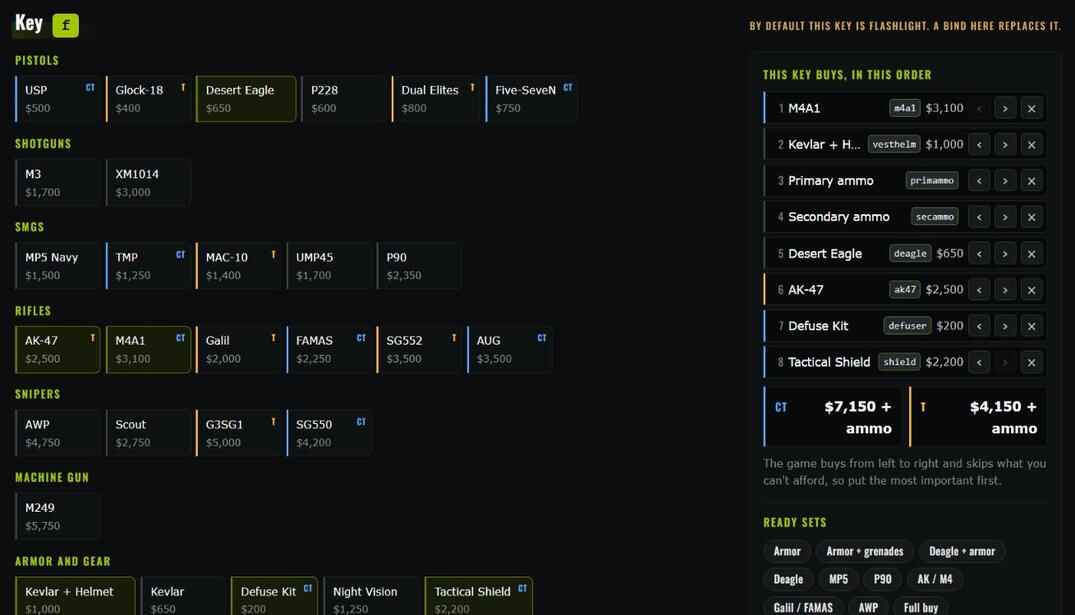
CS 1.6 Buy Binds Generator showing weapon selection, equipment prices, purchase order, and CT/T costs
The finished lines: copy them or take them as a file
  1. Close the game.
  2. Open Steam\steamapps\common\Half-Life\cstrike.
  3. No userconfig.cfg there? Put the downloaded file into the folder. If there is one, open it in Notepad and paste the copied lines at the end.
  4. Start the game, stand in a buy zone at the start of a round and press your key.

Why not config.cfg? The game writes that file again on every exit, and lines added by hand can get lost. userconfig.cfg is yours: the game runs it on start and never touches it.

To try a bind without a restart, open the console with ~ and paste one line there, for example bind "F7" "ak47; m4a1; primammo; vesthelm; defuser". It works right away.

Buy binds are one part of a config. The rest, from mouse settings to rates, is in my CS 1.6 config guide.

CS 1.6 Buy Binds FAQ

Short answers to the questions people ask most

Is the CS 1.6 buy binds generator free?

Yes. No sign-up, no account, nothing to install.

Where do I put buy binds in CS 1.6?

Into userconfig.cfg in the cstrike folder. The game runs that file on every start. Lines you add to config.cfg by hand can get lost, the game rewrites that file on exit.

Can one key buy several things?

Yes. Commands in a bind are split with a semicolon, like bind "F7" "ak47; m4a1; vesthelm". The game goes through them from left to right.

Why are there two rifles in one bind?

One for each side. A T can't buy an M4A1 and a CT can't buy an AK-47, so the game takes the one your team sells and skips the other. One key works on both sides.

Why doesn't my buy bind work?

Check three things: you stand in a buy zone, buy time is not over, and you have the money. If nothing is bought at all, open the console and type exec userconfig.cfg. An error there means the file is in the wrong folder.

Which keys are best for buy binds?

The ones the game doesn't use: the number pad, F1 to F12, the side buttons of the mouse. On the page a dot marks every key that has a job by default.

Are buy binds allowed on servers?

Yes. They are plain commands of the game, the same ones the buy menu sends. They work on any server, with bots too.

How do I remove a buy bind?

Delete its line from userconfig.cfg. To give the key its old job back, bind it again in the game options or type unbind "F7" in the console.

More CS 1.6 Tools

Other CS 1.6 tools on this site first, then the ones for CS2 and Steam.

All CS 1.6 tools →

Leave a Reply

Your email address will not be published. Required fields are marked *