How to Set Up FastDL for a CS 1.6 Server
Maps and sounds in seconds instead of minutes: nginx on the same VPS, game content only
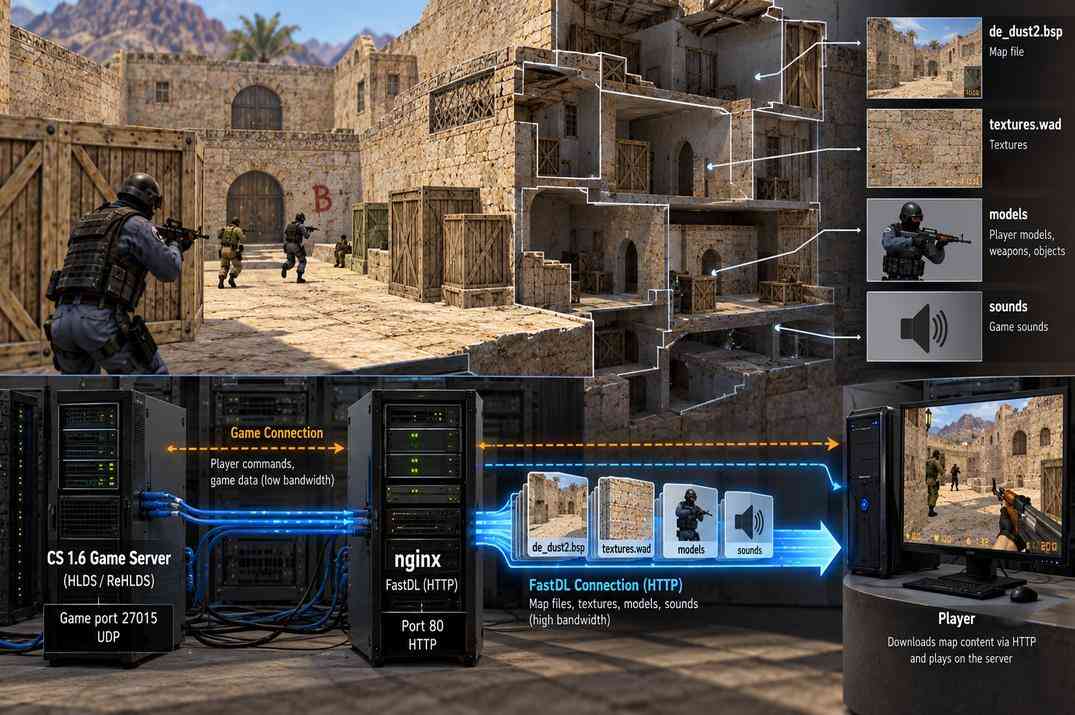
When a player joins a CS 1.6 server with custom content, the client first downloads everything it is missing: maps, sounds, models, sprites. By default these files go through the game connection itself, and that is slow. On my DeathMatch server one sound plugin with 15 small .wav files took about three minutes to download. With FastDL the same 15 files came down in about a second.
FastDL is an ordinary web server running next to the game server and handing out the same files over http. The game server tells the client its address, and the client downloads everything from there instead of the game port. Here I set it up with nginx on the same VPS as the server from the base guide, so no extra hosting is needed. This is what the 2 GB of RAM from the requirements was for.
How FastDL Works
A few things to understand before setting it up. They save a lot of time later, when something does not work.
The client takes the address from the sv_downloadurl cvar and adds the file's path inside the cstrike folder to it. For sound/myplugin/hello.wav and the address http://fastdl.example.com/ it requests http://fastdl.example.com/sound/myplugin/hello.wav. That is why the web server simply points at the cstrike folder.
If a file is missing on FastDL, or the web server refuses to give it, the client does not show an error. It quietly falls back to the slow download through the game connection. So a slow download almost always means FastDL is not being used at all.
The CS 1.6 client cannot download over https, so FastDL needs no SSL certificate and the address always starts with http://.
The cstrike folder also holds server.cfg with the rcon password, reunion.cfg with the salt, plugin configs and logs. The web server must give out game content only and refuse everything else. The config below does exactly that.
Installing nginx
Connect to the server in PuTTY under the cs16 user and install nginx:
sudo apt install -y nginx
nginx starts on its own right after the install. Open http://your_server_ip/ in a browser and you should see the Welcome to nginx! page. That is the default site, I replace it with FastDL a bit later. If the page does not open, check the control panel of your hosting: some providers have their own firewall, and port 80 has to be allowed there.
One small thing that confuses people. Under an ordinary user the nginx command is not found:
-bash: nginx: command not found
nginx is installed, it just lives in /usr/sbin/, which the ordinary user does not have in its path. All nginx commands in this guide go with sudo in front, and then they work.
Giving nginx Access to the Server Folder
nginx runs under its own system user, www-data. The game files sit in the home folder of cs16, and a home folder can be closed to other users. If it is, nginx cannot even get to the cstrike folder and answers 403 to every request, including the maps. Check the whole path with one command:
namei -l /home/cs16/cs16srv/cstrike/maps
It prints every folder on the way and its permissions. Look at the line for cs16. If it looks like this, nginx will not get through:
drwx------ cs16 cs16 cs16
The fix is one command:
sudo chmod o+x /home/cs16
The x permission for other users lets them pass through the folder to a path they already know, but not see what is inside. Nobody can list your home folder, nginx just gets a way to the cstrike folder. After the fix the output looks like this:
f: /home/cs16/cs16srv/cstrike/maps drwxr-xr-x root root / drwxr-xr-x root root home drwx-----x cs16 cs16 cs16 drwxrwxr-x cs16 cs16 cs16srv drwxrwxr-x cs16 cs16 cstrike drwxrwxr-x cs16 cs16 maps
The folders below cs16 end with r-x, so others can read them and nothing else needs changing. If one of them ends with ---, it needs sudo chmod o+rx with its full path.
Creating the FastDL Config
nginx keeps site configs in /etc/nginx/sites-available/. Create a new one there:
sudo nano /etc/nginx/sites-available/fastdl
Paste the config below (in PuTTY a right click pastes). If you have a domain for FastDL, put it into server_name. If not, leave the line as it is, nginx will answer by IP anyway.
# FastDL: game content only, straight from the server's cstrike folder.
# Plain http on purpose: the CS 1.6 client can't download over https.
server {
listen 80 default_server;
listen [::]:80 default_server;
server_name fastdl.example.com;
root /home/cs16/cs16srv/cstrike;
autoindex off;
access_log off;
server_tokens off;
# maps, sounds, models, sprites and their helpers
location ~* ^/(maps|sound|models|sprites|gfx|overviews|resource)/[^/]+(/[^/]+)*\.(bsp|wad|res|txt|mdl|spr|wav|mp3|tga|bmp)$ {
try_files $uri =404;
}
# texture files that live in the cstrike root
location ~* ^/[^/]+\.wad$ {
try_files $uri =404;
}
# configs, plugins, logs, everything else
location / {
return 403;
}
}
Save with Ctrl+O and Enter, exit with Ctrl+X. What each part does:
- listen 80 default_server
- This site answers every request to port 80, including a request by plain IP.
- root
- The cstrike folder of the server. The client adds the file path to the address, nginx adds the same path to this folder.
- autoindex off
- No file lists. Opening a folder in a browser gives 403, nobody can browse what is on the server.
- first location
- The whitelist. A file is given out only if its path starts with one of the listed folders and ends with one of the listed extensions. sound/myplugin/hello.wav passes, addons/amxmodx/configs/users.ini does not.
- second location
- Lets through .wad files from the cstrike root. Custom maps often need them.
- location / → 403
- Catches everything else: server.cfg, addons, logs.
If a plugin uses a file type that is not in the list, add its extension to the first location, separated by |.
Enabling the FastDL Site and Checking It in the Browser
The config is written, now it has to be switched on and the default page switched off. Three commands one by one:
sudo ln -s /etc/nginx/sites-available/fastdl /etc/nginx/sites-enabled/fastdl sudo rm /etc/nginx/sites-enabled/default sudo nginx -t
ln -screates a link to the config in the sites-enabled folder. nginx loads only what is linked there.-
rmremoves the link of the default site. The file itself stays in sites-available , only the link goes. This is required: the default site is alsodefault_serveron port 80, and with two of them nginx refuses to start. nginx -tchecks the config and does not restart anything.
The check should end with two lines:
nginx: the configuration file /etc/nginx/nginx.conf syntax is ok nginx: configuration file /etc/nginx/nginx.conf test is successful
If there is an error, it names the file and the line. Fix it and run sudo nginx -t again. When the test passes, apply the config:
sudo systemctl reload nginx
Checking FastDL in the Browser
No game and no domain are needed for this check, the server IP is enough. Open three addresses:
| Address | Expected result | What it proves |
|---|---|---|
http://your_server_ip/ |
403 Forbidden | The Welcome page is gone and folders are closed |
http://your_server_ip/maps/de_dust2.bsp |
the browser starts downloading the map | nginx reaches the game files |
http://your_server_ip/server.cfg |
403 Forbidden | Configs are not given out |
If the map also gives 403, nginx cannot get into the home folder. Go back to Giving nginx Access to the Server Folder and check namei -l again.
Pointing a Subdomain at FastDL
This step is optional. FastDL works by IP too, but an address like fastdl.example.com looks better, and if the server ever moves to another VPS you change one DNS record instead of the configs. My domain is on Cloudflare, so I show it there. Open your domain in Cloudflare, go to DNS → Records and press Add record:
- Type - A
- Name - fastdl
- IPv4 address - your server IP
- Proxy status - off, the cloud must be grey with the DNS only label
- TTL - Auto
The proxy has to be off. With it on, requests go through Cloudflare servers instead of yours, and FastDL needs the client to talk to your VPS directly. Save the record and check it in Windows CMD:
ping fastdl.example.com
The reply should come from your server IP. If CMD says it could not find the host, wait a few minutes, a new record does not always work right away. Note that ping takes only the host name. With http:// or a path at the end, like ping http://fastdl.example.com/maps/, it always fails, even when everything is fine.
Adding FastDL to server.cfg and Checking It in the Game
nginx is ready, now the game server has to tell clients where to download from. Open /home/cs16/cs16srv/cstrike/server.cfg and add at the end:
// FastDL: players download maps and sounds over http instead of the game connection sv_downloadurl "http://fastdl.example.com/" sv_allowdownload 1 sv_send_resources 1
- sv_downloadurl
- The FastDL address. Without a domain, write the IP: "http://your_server_ip/". The address starts with http:// and ends with a slash.
- sv_allowdownload 1
- Lets players download missing files from the server at all.
- sv_send_resources 1
- Lets the server send custom resources to players.
server.cfg is read when a map starts, so the new lines work only after a map change or a server restart. Until then the old value stays in memory.
Checking FastDL in the Game
First make sure the server took the address. Type in the server console:
sv_downloadurl "sv_downloadurl" is "http://fastdl.example.com/"
If it shows an empty value, "sv_downloadurl" is "", the map has not changed since you edited the file. Load the config by hand with exec server.cfg, type sv_downloadurl again and the address will be there. On the next map change the server reads server.cfg on its own.
Now the real test. Delete one of the custom files from your own game folder, for example a plugin sound, and connect to the server. On Steam, downloaded files usually land in the cstrike_downloads folder. If the file comes down in a second or two, FastDL works. If the download crawls file by file for minutes, the client is not using FastDL. Check sv_downloadurl in the console and open that file's address in a browser.
FastDL for Two Servers on One VPS
I run two servers on one of my machines, Dust2 and DeathMatch, each in its own folder:
- /home/cs16/cs16srv/cstrike/ - Dust2
- /home/cs16/cs16dmsrv/cstrike/ - DeathMatch
The config above has one root, one cstrike folder. For two servers I keep one nginx site and one domain, but give each server its own folder in the address:
- http://fastdl.example.com/dust2/ → /home/cs16/cs16srv/cstrike/
- http://fastdl.example.com/dm/ → /home/cs16/cs16dmsrv/cstrike/
The steps are the same as for one server: install nginx, open the home folder, create the config, enable it, check it. Only the config and the server.cfg lines are different.
# FastDL for Dust2 and DeathMatch: game content only, one folder per server.
# Plain http on purpose: the CS 1.6 client can't download over https.
server {
listen 80 default_server;
listen [::]:80 default_server;
server_name fastdl.example.com;
autoindex off;
access_log off;
server_tokens off;
# Dust2: /dust2/... -> /home/cs16/cs16srv/cstrike/...
location ~* ^/dust2/((maps|sound|models|sprites|gfx|overviews|resource)/[^/]+(/[^/]+)*\.(bsp|wad|res|txt|mdl|spr|wav|mp3|tga|bmp))$ {
alias /home/cs16/cs16srv/cstrike/$1;
}
location ~* ^/dust2/([^/]+\.wad)$ {
alias /home/cs16/cs16srv/cstrike/$1;
}
# DeathMatch: /dm/... -> /home/cs16/cs16dmsrv/cstrike/...
location ~* ^/dm/((maps|sound|models|sprites|gfx|overviews|resource)/[^/]+(/[^/]+)*\.(bsp|wad|res|txt|mdl|spr|wav|mp3|tga|bmp))$ {
alias /home/cs16/cs16dmsrv/cstrike/$1;
}
location ~* ^/dm/([^/]+\.wad)$ {
alias /home/cs16/cs16dmsrv/cstrike/$1;
}
# configs, plugins, logs, everything else
location / {
return 403;
}
}
Why alias and not root. With root, nginx adds the whole requested path to the folder, /dust2/ included, and looks for a dust2 folder inside cstrike, which does not exist. alias throws away the /dust2/ part and puts only what is in brackets, the $1, after the folder path. The whitelist of folders and extensions stays the same.
Then each server gets its own address in its own server.cfg:
// FastDL: players download maps and sounds over http instead of the game connection sv_downloadurl "http://fastdl.example.com/dust2/" sv_allowdownload 1 sv_send_resources 1
// FastDL: players download maps and sounds over http instead of the game connection sv_downloadurl "http://fastdl.example.com/dm/" sv_allowdownload 1 sv_send_resources 1
The browser check is the same, only with the folder in the address: http://your_server_ip/dust2/maps/de_dust2.bsp and http://your_server_ip/dm/maps/de_dust2.bsp should download the map, http://your_server_ip/dm/server.cfg should give 403. And check sv_downloadurl in the console of each server. On my DeathMatch the address stayed empty because the map had not changed since I edited server.cfg. Dust2 already had it and downloaded in a second, DM was still pulling the same files for three minutes through the game port. One exec server.cfg fixed it.
A third server on the same VPS is one more pair of location blocks with its own folder name, the domain stays the same.
FastDL Problems and Fixes
Everything I ran into myself while setting up FastDL on three servers.
| Problem | Cause | Fix |
|---|---|---|
| nginx: command not found | The nginx command lives in /usr/sbin/, which an ordinary user does not have in its path | Run nginx commands with sudo |
| nginx -t fails with a duplicate default server for 0.0.0.0:80 | The default site is still enabled next to FastDL | sudo rm /etc/nginx/sites-enabled/default, then sudo nginx -t again |
| The map in the browser gives 403 | nginx cannot pass through the home folder | sudo chmod o+x /home/cs16, check with namei -l |
| The browser downloads the file, the game downloads slowly | The server does not know the address, sv_downloadurl is empty | Check sv_downloadurl in the console, exec server.cfg or change the map |
| Everything downloads fast except one file | The file is not on the server, or its name differs in letter case. Linux treats Sound.wav and sound.wav as two different files | Open that file's address in a browser and compare the name with the file on the server |
| ping cannot find the host | The address was typed with http:// or a path | ping takes only the host name: ping fastdl.example.com |
| The domain does not open, the IP does | The DNS record has not spread yet, or the Cloudflare proxy is on | Wait a few minutes, check that the cloud is grey (DNS only) |
The main rule for checks: if something downloads slowly in the game, open the same file's address in a browser. If the browser downloads it, the problem is in server.cfg. If the browser gives 403 or 404, the problem is in nginx or in the file itself.

CS 1.6 Dedicated Server on Linux
VPS, SSH, SteamCMD with steam_legacy, first run and screen.
open →
Metamod-R, AMX Mod X and Plugins
The loader and the plugin platform. Installing a plugin, why you compile .sma yourself, and what the compiler errors mean.
open →
ReUnion: non-Steam Clients
Letting non-Steam clients in, how they get a SteamID, and which authentication modes make sense.
open →FastDL FAQ
I set up FastDL, but players still download files slowly. Why?
The client is not using FastDL and has fallen back to the game connection. Type sv_downloadurl in the server console. If it is empty, the map has not changed since you edited server.cfg: run exec server.cfg or change the map. If the address is there, open the slow file's address in a browser. A 403 or 404 means nginx cannot reach the file, or its name differs in letter case from what the plugin asks for.
Do I need a separate hosting or a domain for FastDL?
No. nginx on the same VPS and the plain IP in sv_downloadurl work fine. A subdomain is a convenience: nicer address, one DNS record to change if the server moves.
Can FastDL use https?
No. The CS 1.6 client downloads over plain http only, so the address always starts with http:// and no certificate is needed. That is also why the Cloudflare proxy has to be off for the FastDL subdomain.
Is it safe to point a web server at the cstrike folder?
Only with a whitelist like the one in this guide. The folder holds server.cfg with the rcon password and reunion.cfg with the salt. The config gives out listed game folders and extensions only and answers 403 to everything else, and the browser check with /server.cfg proves it.
A map downloads from FastDL but the game says it is missing a .wad or .res file.
Those files must be on the server in the same place the map expects them: .wad in the cstrike root, .res next to the map in maps/. Both are in the whitelist. Check the file's address in a browser and the letter case of its name.
Can I put the FastDL files on another machine?
Yes, any web server that serves the same folder structure works. You then have to keep its copy of maps, sounds and models in sync with the game server by hand, which is why on a single VPS it is simpler to point nginx straight at the cstrike folder.