How to Make Your Steam Inventory Public and Check Your CS2 Inventory Value
Privacy settings, the right profile link, a free calculator, and why the total is not what you will get paid
Your Steam inventory can hold anything from a few cheap skins to knives, gloves, cases, and items you forgot about years ago. If you want to know what it is actually worth, you need two things: a public inventory and reliable price data.
In this guide I'll show where the inventory privacy setting lives in Steam, which profile link or ID a calculator needs, how to get the CS2 inventory value in a few seconds, and why different services can show very different totals for the same items.
Why Check Your CS2 Inventory Value?
The reasons are usually pretty simple. Maybe you plan to sell some items and want to know how much money you are actually dealing with. Maybe you are getting ready for a trade and do not want to give away a knife for a few cases.
Or maybe you just have not looked at your inventory in years. If you have been playing since the CS:GO days, you might have hundreds of cases, skins, and stickers sitting there without any real idea of what they are worth today.
And sometimes it is plain curiosity. You open your inventory, see everything you have collected over the years, and want to know what the whole thing is worth, or how much one particular item could sell for.
How to Make Your Steam Inventory Public
Steam lets you control the visibility of several parts of your profile separately. Three of them matter here:
- Game details
- Your games, playtime, and achievements. This setting also controls whether other people can see which game you are playing right now.
- Friends List
- Who can see your Steam friends.
- Inventory
- Items from games that support trading, Steam Trading Cards, extra copies, and gifts. CS2 medals and coins show up here too, even though they cannot be sold.
Your inventory cannot be public while the profile itself is set to Private. A private profile hides everything inside it. Friends Only is not enough either: a calculator is not on your friends list, so for it the inventory is still closed.
Step by Step: Steam Inventory Privacy Settings
You can change these settings on the Steam Community website, in the Steam desktop client, or in the mobile app. The options are the same, only the interface looks slightly different.
- Sign in to Steam Community or open the Steam client.
- Open your profile (click your name) and press Edit Profile.
- Pick Privacy Settings in the menu on the left. On mobile you may need to scroll the menu sideways to find it.
- Make sure My profile is set to Public , then find Inventory and set it to Public as well.
There is no Save button. Steam applies the change right away, and you can make the inventory private again from the same menu at any time. To check that it worked, open your inventory in a private browser window (where you are not signed in):
steamcommunity.com/profiles/YOUR_STEAMID64/inventory/#730
730 is the app ID of Counter-Strike 2, so the link opens straight on the CS2 tab. If you see your items, the inventory is public. If Steam still says "This profile is private", go back to the privacy settings and check both options again.
Finding Your Steam Profile Link or SteamID
Every calculator needs some way to identify the account. Any of these three will do:
- Profile link
-
The easiest option. Open your profile and copy the address from the browser. It looks like one of these two:
steamcommunity.com/profiles/76561198000000000 steamcommunity.com/id/coolninja
- SteamID64
- A 17-digit number that always starts with 7656119. It is the number in the first link above.
- Vanity name
- The coolninja part of the second link: the custom name in the address bar, not the display name on your profile page.
The vanity name catches a lot of people out. Your profile might show something like ☆CooL NinJa☆ while the URL is still coolninja. The calculator needs the second one.
Which link you have depends on whether you ever set a custom URL. New accounts show the numeric version by default. If a service asks for a SteamID64 and all you have is a vanity link, my SteamIDs Finder converts one into the other. Steam also uses a few other ID formats (SteamID, SteamID3, AccountID), and I explained all of them in a separate Steam ID guide.
How to Check Your CS2 Inventory Value
There are two ways: check item prices by hand, or use an online inventory calculator.
Check CS2 Item Prices Manually
Open each item, look at current offers on a few marketplaces, and add the prices together. That works with 30-50 items. With 300 or more it gets painfully slow. To check what one knife is worth, the manual way makes sense. For a whole inventory, it does not.
Use a CS2 Inventory Value Calculator
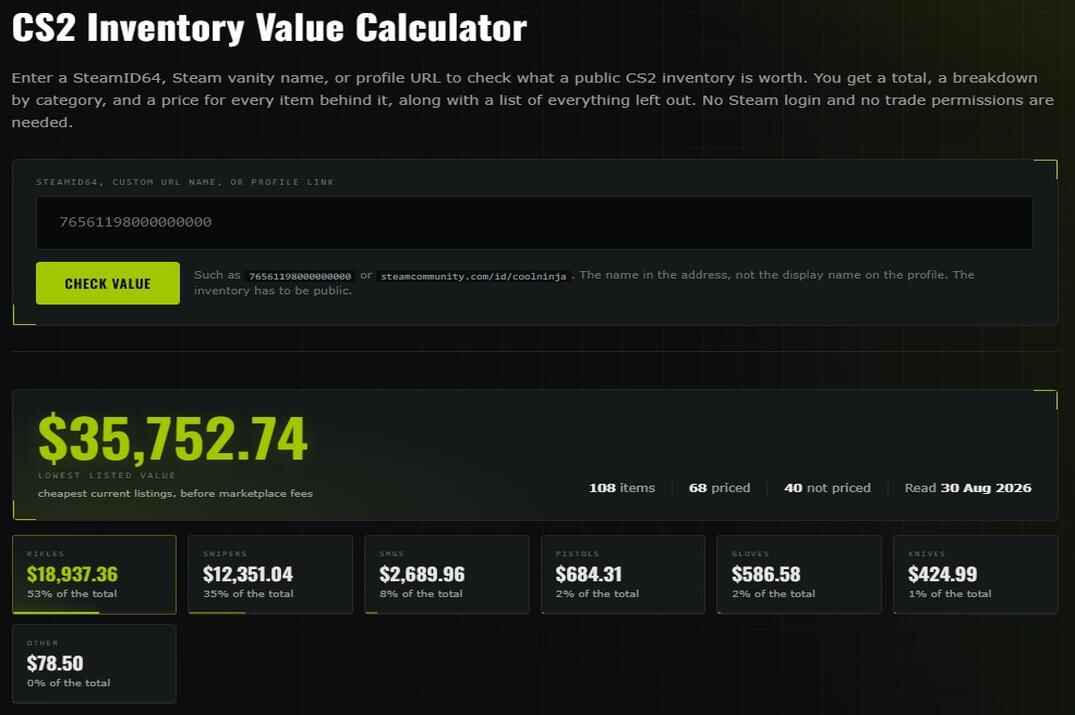
A calculator does the same job automatically. You paste a Steam profile link, an inventory link, or a SteamID, and the service reads the public inventory and matches each item with current marketplace prices.
My CS2 Inventory Value Calculator, for example, takes the lowest available price from five marketplaces: CSFloat, Skinport, Waxpeer, DMarket, and Steam Market. Next to every item it shows which marketplace the price came from.
No Steam login and no trade permissions are needed.
If an item cannot be priced, it is not quietly counted as $0. The calculator shows the reason instead: the item is not tradable or marketable, there are no active listings, or that item category is not supported yet.
Why CS2 Inventory Calculators Show Different Values
Check the same inventory on three services and you can easily get three different totals. Sometimes the gap is big. There are four main reasons.
One calculator uses only Steam Market, another uses third-party marketplaces, a third combines many sources. The same knife can cost noticeably different money on Steam and on Skinport.
The lowest active listing, the average price over the last week, and the median of recent sales all give different numbers for the same item.
Some services count stickers, float values, or patterns. Others price an item only by its name and wear. On a cheap inventory the difference is small. On an expensive one it can be hundreds of dollars.
Some services update prices every few minutes, others only once a day.
So any inventory total is an estimate, not an exact amount you are guaranteed to receive.
Inventory Value vs What You Actually Get When You Sell
This is where most people get disappointed, so it's worth being clear about it.
Almost every calculator shows a buy price: what it would cost someone to put together that inventory from scratch today. What you would actually get for selling the same items is lower, for a few reasons:
- Every marketplace takes a cut. On Steam Market it is 5% for Steam plus 10% for Counter-Strike 2, so around 15% on top of what you receive. Third-party sites usually take less, but never nothing.
- Steam Market money stays on Steam. Sales go to your Steam Wallet and cannot be withdrawn. You can spend them on games and other items, but not move them to a bank card.
- Prices move while the item is listed. A skin that waits three weeks for a buyer is not worth what it was on the day you listed it.
- Liquidity varies a lot. A popular knife sells in hours. A pile of old cases can sit for months at any price.
- Instant cashout is always below market. Sites that buy your items immediately charge for the convenience, and you are the one paying for it.
- Freshly traded items are locked. Since 2025, items you receive in a trade are Trade Protected for 7 days: you cannot sell, trade, or use them until the shield in the inventory disappears.
Hope for the best, prepare for the worst. If you sell at a reasonable pace, expect roughly 15-45% less than the estimate, and a lot less if you need the money today.
Is It Safe to Use a CS2 Inventory Value Calculator?
Checking the value of a public CS2 inventory does not need access to your account, your trades, or your Steam Guard codes. A public profile link or a SteamID is enough for a calculator to read the inventory.
So there is no reason to sign in to Steam just to see what your inventory is worth. Some legit services use Steam sign-in for extra account features, but a basic value check should work without it.
Be especially careful with sites that open a Steam login page or ask for account details. Fake Steam login pages are one of the most common ways to steal accounts and inventories.
- Never share a Steam Guard code. Enter it only on an official Steam page, and only when you are signing in on purpose.
- A Trade URL is not needed to calculate value. Marketplaces may ask for it for deposits and trades, a calculator does not.
- Check the domain before you type anything. The official Steam Community domain is steamcommunity.com . Lookalikes such as steamcomunity.com or steamcomunnity.com , and any address made to resemble Steam, should be treated as phishing.
If a site only needs to calculate the value of a public inventory, it has no business asking for your password, a Steam Guard code, or trade permissions.
CS2 Inventory Value FAQ
Why does the calculator say my inventory is private even though I made it public?
Check the main setting first: My profile must be Public, not only Inventory. Also make sure Inventory is Public and not Friends Only. If both are right, wait a few minutes and try again: Steam's inventory service sometimes does not respond.
Do I need to sign in through Steam to check my inventory value?
No. A public Steam profile link or SteamID is enough to read the inventory and calculate its value.
Can I check another player's CS2 inventory?
Yes, as long as their inventory is public. The calculator only reads what Steam already shows to everyone.
Are stickers applied to weapons included in the value?
It depends on the calculator. Mine currently prices items by base item, skin, and wear, and does not add extra value for applied stickers.
Why do some items have no price?
Usually for one of three reasons: the item cannot be sold, there are no active listings for it right now, or that item category is not supported yet. This is typical for medals, coins, and other non-marketable items.
Does making my Steam inventory public make my account less secure?
No. It changes only who can see the items. Nobody gets access to your account, and nobody can trade your items without your confirmation.