
CS 1.6 Config Generator
Set the game up with switches and take the finished userconfig.cfg
A config is a text file of console commands that the game runs at the start. Writing one by hand means knowing a hundred command names and what each number does. Here you flip switches, read in plain words what each one changes, and the page writes the file.
It is made for Counter-Strike 1.6 on Steam, and most of it works on Non-Steam builds too. The values marked Mine are the ones from my CS 1.6 config guide. The values marked Game come from the config a fresh game writes for itself.
Pick a start, then change what you like. Only the settings you touch go into the file, the rest stays the way your game has it.
A start sets the FPS, graphics, network, mouse and HUD parts. Your keys, scripts and other lines stay.
I have a config already: read it
Paste your config.cfg or userconfig.cfg, or drop the file on the box. The switches take your values. Lines I have no switch for go to Other lines and into the new file as they are. Turn on Only what differs from a fresh game and you see what you ever changed.
Your config
- Open
Steam\steamapps\common\Half-Life\cstrike. - No
userconfig.cfgthere? Put the downloaded file in. If there is one, open it in Notepad and paste the lines at the end. - Start the game. To try the file without a restart, type
exec userconfig.cfgin the console.
Not config.cfg: the game rewrites it on every exit. Not autoexec.cfg: it runs first and config.cfg overrides it. The whole story is in my config guide.
How to Make a CS 1.6 Config
From nothing to a working file in a few steps
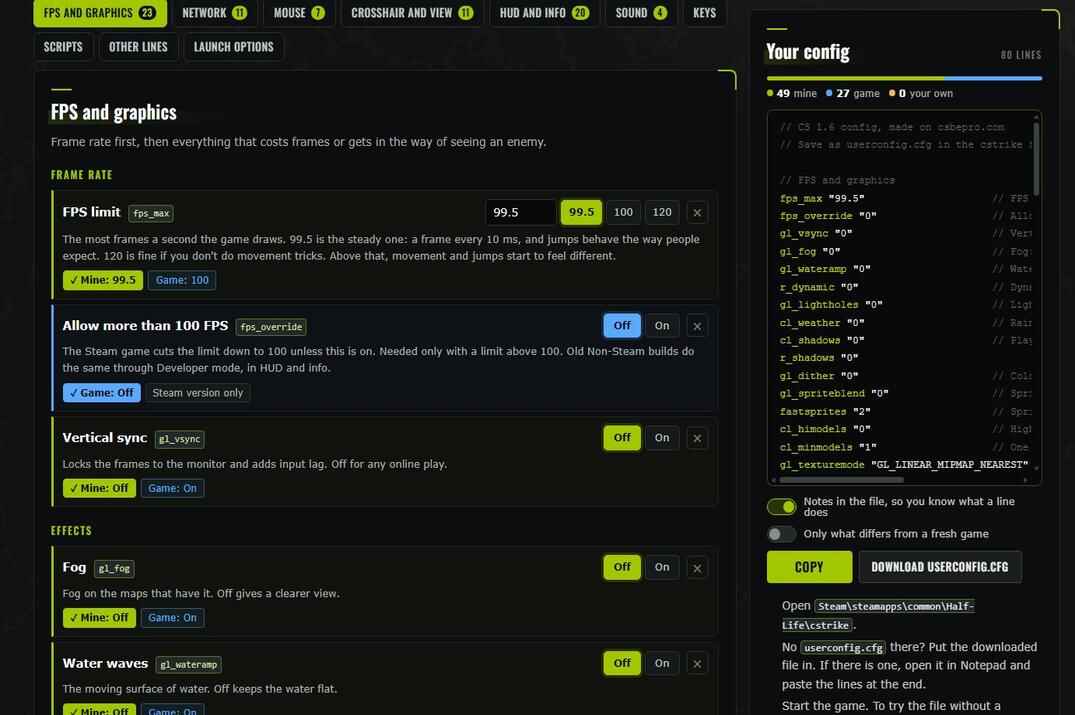
- Pick a start. My guide config is the set I play with. Max FPS is the same, cut down further for a weak PC. Game defaults is what a fresh game has.
- Go through the tabs and change what you want. Every setting says in plain words what it does. Mine and Game under it put my value or the game's value in one click.
- Watch the file on the right. The line you just changed lights up. Click any line there and the page takes you to its setting.
- Set what no start sets for you: Sensitivity, the crosshair colour, your nickname.
- Press Copy or Download userconfig.cfg and put the file into the game, see Into the Game.
Only the settings you touched go into the file. A setting you left alone stays grey, and the game keeps what it has. The cross at the end of a row takes a setting back out.
Have a config already? Open I have a config already: read it and paste your config.cfg or userconfig.cfg, or drop the file on the box. The switches take your values. Lines the page has no switch for, your aliases for example, go to Other lines and into the new file exactly as they were.
Turn on Only what differs from a fresh game and the file keeps just the lines that are not the way a new game has them. Paste an old config with this on, and you see everything you ever changed in it.
The page remembers your work in this browser, so you can close it and come back.
CS 1.6 Config Settings in the Generator
Six tabs of settings, and a guide behind each
| Tab | What it sets | The long read |
|---|---|---|
| FPS and graphics | The FPS limit, vertical sync, fog, shadows, weather, texture detail, shells, blood, bullet holes | How to increase FPS |
| Network | Rate, updates and commands a second, interpolation, lag compensation, downloads | Lower ping, ex_interp |
| Mouse | Sensitivity, sensitivity in a scope, raw input, smoothing, acceleration | Mouse settings |
| Crosshair and view | Colour, size, see-through, moving or still, weapon hand, weapon sway, brightness, gamma | Crosshair guide, cl_bob |
| HUD and info | Nickname, fast weapon switch, net graph, radar, scoreboard, kill messages | net_graph |
| Sound | Game, music and voice chat volume | How I set up the sound |
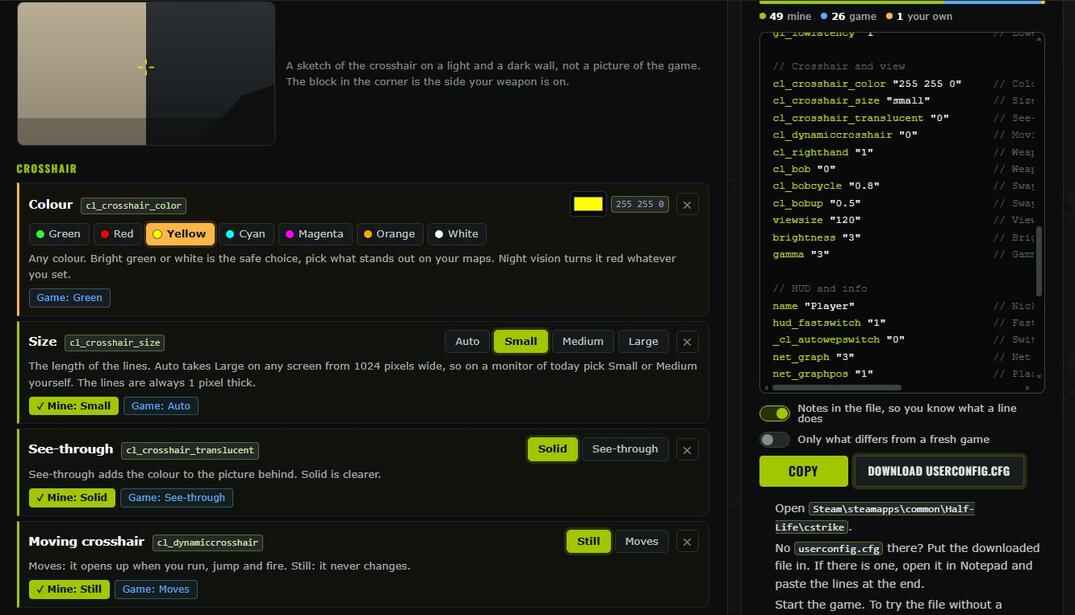
A few settings carry a note, and it is worth reading:
- Needs a game restart
-
Texture detail,
gl_picmip, changes only after you start the game again. - A server can force its own value
-
Rates,
cl_minmodels,r_decalsand a few more. Your value comes back when you leave the server. - Steam version only
-
m_rawinput,fps_overrideandgl_lowlatency. An old Non-Steam build just ignores the line.
The page also warns you when two settings don't go together: an FPS limit above 100 without Allow more than 100 FPS, a black crosshair that is see-through, an interpolation value that is too low for a real server.
Louder footsteps are not in the list on purpose. That is not a console command, I do it with the sound files, and the Sound tab links to how.
Keys, Buy Binds and Scripts
Binds on a keyboard you can click, and scripts you switch on
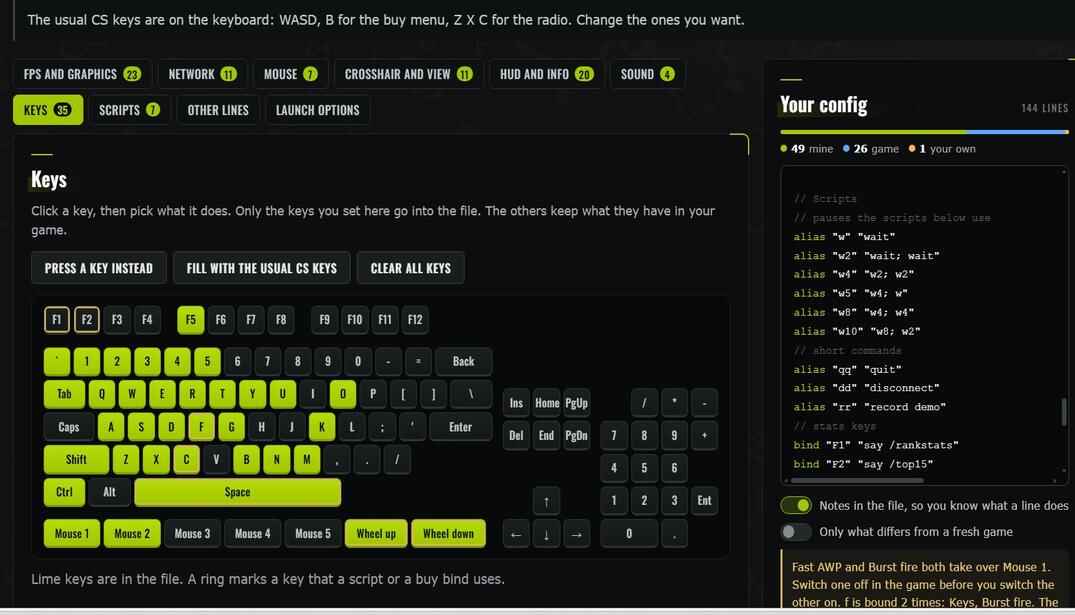
- Keys
- Click a key and pick an action: move, fire, a weapon slot, chat, radio, a menu. Or type your own command, a chat line for example. Only the keys you set go into the file.
- Buy binds
- Made some in my CS 1.6 Buy Binds Generator? One switch adds them to this file. The page finds them by itself, in the same browser.
- Scripts
- Seven small helpers from my guide: short console commands, stats keys, jump and duck on the wheel, jump and crouch on one key, Fast AWP, Burst fire. All off until you turn one on. More of them are in my scripts collection.
- Other lines
- A box for everything else: your own aliases, a plugin setting, a line you found somewhere. It goes to the end of the file as it is.
One key holds one bind. When a key gets two, in Keys and in a script for example, the page says which and tells you which line wins: the later one.
Fast AWP and Burst fire take over Mouse 1. They are made of normal commands, but some servers and leagues don't allow them. Check the rules where you play.
CS 1.6 Launch Options
One line for Steam or a shortcut, built apart from the file
Launch options are not part of a config. It is a line of keys the game reads before any file, and you paste it into Steam or into a shortcut. The Launch options tab builds that line next to your config, so the whole setup is in one place.
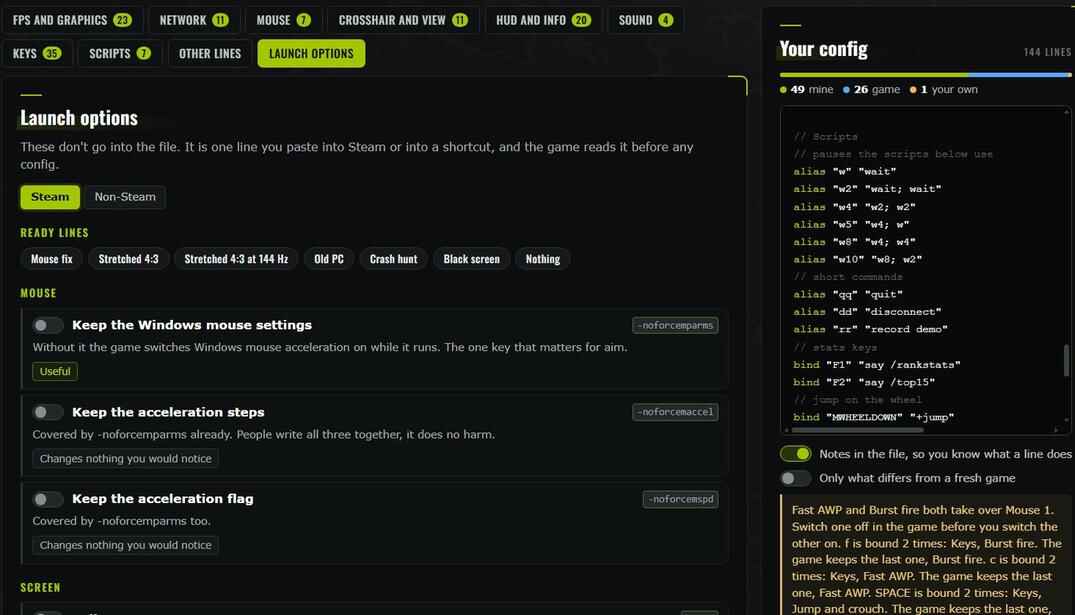
- Every key has a verdict: Useful, Only if you need it or Changes nothing you would notice.
- Ready lines for common cases: the mouse fix, stretched 4:3, 144 Hz, an old PC, a crash hunt, a black screen at the start.
- Steam or Non-Steam changes the line and tells you where to paste it.
Keys like -high, -novid and -threads are left out on purpose: the engine of CS 1.6 does not read them. The full list with the reasons is in my CS 1.6 launch options guide.
Where to Put the Config in CS 1.6
userconfig.cfg, and why not the other two files
- Open the game and type
writecfg mybackupin the console. Now your old settings are safe inmybackup.cfg. - Close the game and open
Steam\steamapps\common\Half-Life\cstrike. - No
userconfig.cfgthere? Put the downloaded file into the folder. If there is one, open it in Notepad and paste the copied lines at the end. - Start the game. The file runs by itself.
- config.cfg
- The game's own file. It is written again on every exit, and lines the game does not keep are gone. Don't edit it by hand.
- autoexec.cfg
-
Runs first, and then
config.cfgoverrides what it set. Fine for tests, wrong for your settings. - userconfig.cfg
- Runs last and the game never touches it. This is the one.
To try a file without a restart, type exec userconfig.cfg in the console. Watch out for Windows adding .txt to the name: the file has to be userconfig.cfg, not userconfig.cfg.txt.
Want everything back? exec mybackup.cfg returns your old settings. For a clean start press Game defaults on this page and run that file.
CS 1.6 Config Generator FAQ
Short answers to the questions people ask most
Is the CS 1.6 config generator free?
Yes. No sign-up, no account, nothing to install.
Where do I put the config file in CS 1.6?
Into the cstrike folder, under the name userconfig.cfg. The game runs it by itself at every start, right after its own config.cfg.
Why userconfig.cfg and not config.cfg or autoexec.cfg?
The game rewrites config.cfg on every exit and throws out lines it does not keep. autoexec.cfg runs first, and then config.cfg overrides it. userconfig.cfg runs last and the game never touches it.
Will this config get me banned?
No. Every line is a normal command of the game, the same ones the options menu and the console use. The two scripts that take over Mouse 1, Fast AWP and Burst fire, are marked: some servers and leagues don't allow them, so check the rules where you play.
Why did a setting change back after I joined a server?
Servers limit rate, cl_updaterate and cl_cmdrate, and plugins can force things like cl_minmodels or r_decals. Such settings carry a note on the page. Block commands from servers stops a part of it.
How do I get my old settings back?
Before you start, type writecfg mybackup in the console: the game saves what you have now to mybackup.cfg, and exec mybackup.cfg brings it back. To go back to a fresh game, press Game defaults on the page and run that file.
Can I see what I changed in my own config?
Yes. Open I have a config already, paste your config.cfg and turn on Only what differs from a fresh game. What is left in the file is everything that is not the way a new game has it.
Do launch options go into the config file?
No. They are one line for Steam or for a shortcut, and the game reads it before any config. The page builds that line apart from the file, on the Launch options tab.
More CS 1.6 Tools
Other CS 1.6 tools on this site first, then the ones for CS2 and Steam.
- // live statsCS 1.6 Steam Server StatsReal players on every CS 1.6 server in the Steam list, fake farms filtered out, with history.CS 1.6open →
- // server queryCS 1.6 Server InfoWho is on a server right now, its map, cvars, plugins and ping from other countries.CS 1.6open →
- // demo parserCS 1.6 Demo AnalyzerScoreboard, rounds, kill feed, chat, SteamIDs and a 2D replay from a GoldSrc demo, in the browser.CS 1.6open →
- // model editorCS 1.6 Model EditorOpen a .mdl, look at it from any side, recolour the textures, put your own picture or text on it and save.CS 1.6open →
- // spray makerCS 1.6 Spray MakerTurn any picture into a CS 1.6 spray: colour or one colour, transparent background, your nickname on top. Preview it on a de_dust2 wall and download tempdecal.wad.CS 1.6open →
- // model editorCS 1.6 Model EditorFree online CS 1.6 model editor. Drop a .mdl file to view it in 3D, repaint textures, add your nickname or a logo, check hitboxes and download the skin.CS 1.6open →
- // wad editorCS 1.6 WAD EditorOpen a Half-Life or CS 1.6 .wad file in your browser: browse textures, save PNG, recolour, resize, add text, make see-through textures and download the new WAD.CS 1.6open →
- // sprite editorCS 1.6 Sprite EditorOpen a Half-Life or CS 1.6 .spr sprite (or whole folder) in your browser: play it, change the render mode, recolour it, swap and add frames, make a sprite from pictures and download it.CS 1.6open →
- // binds generatorCS 1.6 Buy Binds GeneratorClick a key, pick the weapons, armor and grenades it buys, and copy ready buy binds for CS 1.6. Ten ready sets for F1-F10, userconfig.cfg in one click.CS 1.6open →
- // lookupSteamID LookupAny ID or profile link in, every format out, plus bans, account age, hours and what they play now.CS 1.6 · CS2open →
- // test yourselfAim TestClick the targets and see how fast and how accurate your aim is.CS 1.6 · CS2open →
- // test yourselfReaction TestClick the moment it changes and get your reaction time in milliseconds.CS 1.6 · CS2open →