Weapon Sway in Counter-Strike 1.6 (cl_bob Guide)

Table of Contents

Introduction

Weapon sway - also known as weapon shake or hand movement - is one of those tiny details that make Counter-Strike 1.6 instantly recognizable. When you walk or run, your weapon model moves rhythmically up and down, creating a sense of motion and realism. This "hand shake" effect is powered by the old GoldSrc engine, the same system that shaped the visual feel of Half-Life and early Counter-Strike builds.

For casual players, it adds atmosphere - the screen feels alive, almost cinematic. But for most players, constant movement can be distracting, especially when trying to focus on headshots or control spray. That’s why many people still search for ways to remove weapon shake in CS 1.6 or fine-tune it using the cl_bob commands.

What Is Weapon Sway in Counter-Strike 1.6

In Counter-Strike 1.6, weapon sway is a purely visual animation tied to how your character moves. It makes your weapon tilt and bounce slightly as you walk, run, or stop. Unlike recoil or bullet spread, this movement doesn’t change accuracy - it only changes how your weapon looks on screen.

The motion is controlled by special console variables such as cl_bob, cl_bobcycle, and cl_bobup. Together, they define how much your weapon sways, how quickly it cycles, and how high or low it moves. By default, these values create that classic GoldSrc look - the light, constant shaking familiar to anyone who’s played CS 1.6 since the early 2000s.

The Role of cl_bob, cl_bobcycle, and cl_bobup
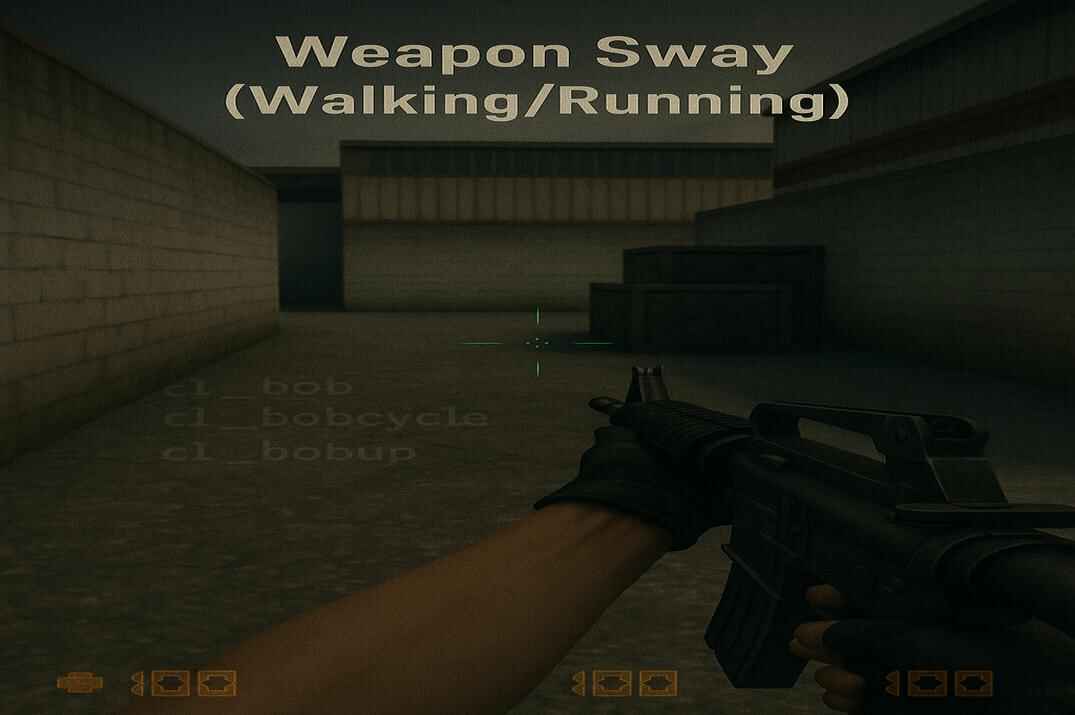
First-person view in Counter-Strike 1.6 showing weapon sway of an M4A1 while walking on a classic map, with a faint console overlay showing commands cl_bob, cl_bobcycle, and cl_bobup

The way your weapon sways in Counter-Strike 1.6 isn’t random - it’s controlled by three console commands that define how far, how fast, and how smoothly the animation moves. These are cl_bob, cl_bobcycle, and cl_bobup, and they’ve been part of the game since the early GoldSrc builds.

cl_bob - controls the amplitude of the weapon’s movement. The higher the value, the stronger the visible shake. Setting it lower makes your weapon look steadier and closer to a "no shake" style.

cl_bobcycle - determines how fast the sway loop repeats. Smaller values slow down the rhythm, giving a heavier, more realistic motion, while higher values make it quick and jittery.

cl_bobup - affects the vertical offset, or how much your weapon bounces up and down during each cycle.

In the default config.cfg file, only one of these commands - cl_bob "0.01" - is written explicitly, but the other two are also active in the background with their default values:

cl_bob "0.01"
cl_bobcycle "0.8"
cl_bobup "0.5"

In older builds of CS 1.6, the GoldSrc engine didn’t fully accept zero values, but in modern Steam and stable non-Steam versions, these parameters can be freely adjusted - even down to zero - allowing players to achieve anything from a subtle motion to a completely static weapon style.

How to Disable Weapon Shake (Static View)

If you want your weapon to stay completely still while moving in Counter-Strike 1.6, you can easily disable the sway effect through the console or your config file. This setup is especially popular among competitive players who prefer a clean, distraction-free view for aiming and recoil control.

To do it, open the in-game console and enter the following commands:

cl_bob "0"
cl_bobcycle "0"
cl_bobup "0"

You’ll notice the difference immediately - the weapon will stop moving up and down when you walk or strafe, creating a perfectly static first-person view. Many players describe it as feeling sharper and more consistent, especially during fast aim corrections or long spray control.

To make these settings permanent, it’s best to save them in userconfig.cfg - a custom configuration file that automatically loads every time the game starts. This file is separate from your main config.cfg, and it’s where players store personal tweaks, key binds, rates, and visual preferences. If it doesn’t exist yet, simply create a new text file named userconfig.cfg in your /cstrike/ folder and add the commands inside. That way, your static weapon setup will always apply - even after game restarts or server changes.

To learn more about creating and managing this file, check out my detailed CS 1.6 Config Guide, where I explain how configuration files work and how to organize your own pro setup.

Counter-Strike 1.6 main menu with developer console open, showing cl_bob commands to adjust weapon sway
CS 1.6 Console - Weapon Sway Commands (cl_bob default values)

If you ever want to bring the classic motion back, simply revert to the default values:

cl_bob "0.01"
cl_bobcycle "0.8"
cl_bobup "0.5"
Disabling weapon shake doesn’t change gameplay physics or recoil - it’s a visual preference.

Creating a Realistic Sway Style

While many players prefer a static view, others love the authentic old-school motion that makes Counter-Strike 1.6 feel alive. The gentle sway of the weapon and hands - powered by the GoldSrc engine - adds a sense of weight and realism that newer versions of the game often lack. If you enjoy that cinematic, slightly heavy movement, you can easily bring it back by adjusting your cl_bob settings.

Try the following configuration:

cl_bob "0.02"
cl_bobcycle "0.6"
cl_bobup "0.5"

This setup slows down the animation and gives your weapon a smoother, more natural motion instead of a fast jitter. It’s especially effective when paired with HD weapon models or remastered texture packs, where the movement feels more physical and immersive.

Some players who record videos or play for nostalgia use this "realistic sway" style to keep the classic CS 1.6 atmosphere intact - the way the game looked and felt in early LAN days. It doesn’t give any gameplay advantage, but it brings back that original GoldSrc rhythm that defined Counter-Strike’s visual identity for years.

Conclusion

Weapon sway in Counter-Strike 1.6 is one of those small visual details that make the game feel alive. Whether you prefer a perfectly still weapon for precise aiming or the classic GoldSrc motion for nostalgia - the choice is entirely yours. By tuning just three simple commands - cl_bob, cl_bobcycle, and cl_bobup - you can shape how the game looks and feels every time you move.

These settings don’t change gameplay balance or recoil, but they do change the experience. A clean, static view can help you focus, while a gentle sway keeps that familiar CS 1.6 atmosphere many players still love. Experiment, find what fits your style, and remember: mastering Counter-Strike isn’t only about aim - it’s also about making the game feel just right for you.

If you want to refine your overall setup even further, it also makes sense to check your CS 1.6 Crosshair Guide – Best Settings & Colors, Best Mouse Settings in Counter-Strike 1.6, and CS 1.6 FPS Boost - Best Settings for Stable FPS. Together, these changes can help make the game feel cleaner, more responsive, and more comfortable in everyday play.

CS 1.6 Weapon Sway FAQ

A glowing 'FAQ' displayed on a futuristic holographic panel, surrounded by floating question marks and digital circuitry within a cosmic, sci-fi environment
What does cl_bob do in Counter-Strike 1.6?

It controls how much your weapon moves when you walk or run. Lower values reduce the sway, while higher values make it more visible.

How can I completely remove weapon shake in CS 1.6?

Type these commands in your console:

cl_bob 0
cl_bobcycle 0
cl_bobup 0

They will make your weapon stay perfectly static.

Does disabling weapon sway affect recoil or accuracy?

No. It’s only a visual change - the shooting mechanics and spray patterns remain the same.

Where should I save my cl_bob settings?

The best place is userconfig.cfg inside your /cstrike/ folder. It loads automatically every time the game starts.

Can I use different cl_bob settings for different mods like Condition Zero?

Yes, each game keeps its own config files. You can copy your preferred settings manually into each mod’s folder.

What are the default cl_bob values in CS 1.6?
cl_bob 0.01
cl_bobcycle 0.8
cl_bobup 0.5
Is there any benefit to keeping a small amount of sway?

It’s purely aesthetic. Some players prefer a light sway for a more natural, classic look - it doesn’t impact aim.

Can servers override my cl_bob settings?

No, these are client-side commands. Your personal visual settings stay the same regardless of the server.
Continue Reading

Counter-Strike 1.6 scoreboard with a player using an invisible nickname highlighted in the TAB menu
Invisible Nick in Counter-Strike 1.6 – Full Guide

Invisible Nick in Counter-Strike 1.6 – Full Guide Table of Contents Introduction Nicknames in Counter-Strike 1.6 appear everywhere during a game: in the scoreboard, in chat, in the killfeed, and above the player model. It’s the main way other players recognize you on a server. But CS 1.6 is an

Read More
Leave a Reply

Your email address will not be published. Required fields are marked *