
zont1x CS2 Settings, Crosshair & Gear

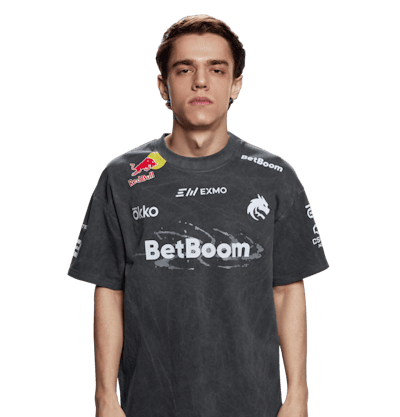
 Team Spirit
zont1x CS2 Settings & Gear
Mouse and Sensitivity
DPI
800
Sensitivity
1.05
eDPI
840
Zoom Sensitivity
1
Polling Rate
1000 Hz
Windows Sensitivity
6
Raw Input
On
Mouse Acceleration
Off
Video
Resolution
1024x768
Aspect Ratio
4:3
Scaling
Stretched
Refresh Rate
360 Hz
Display Mode
Fullscreen
Monitor
ZOWIE XL2586X+
Video, In Game
Boost Player Contrast
Enabled
Wait for Vertical Sync
Disabled
Multisampling Anti-Aliasing Mode
8x MSAA
Global Shadow Quality
High
Dynamic Shadows
All
Model / Texture Detail
Low
Texture Filtering Mode
Bilinear
Shader Detail
Low
Particle Detail
Low
Ambient Occlusion
Disabled
High Dynamic Range
Performance
FidelityFX Super Resolution
Disabled
NVIDIA Reflex Low Latency
Enabled + Boost
Viewmodel
FOV
68
Offset X
2.5
Offset Y
2
Offset Z
-2
Preset Position
0
Gear
Keyboard
Wooting 80HE
Headset
HyperX Cloud III Wireless
zont1x CS2 Crosshair
Crosshair
Style
4
Length
2
Thickness
0
Gap
-3
Center Dot
Off
T Style
Off
Outline
Off
Outline Thickness
0
Use Alpha
On
Alpha
255
Follow Recoil
Off
Friendly Fire Warning
On
Deployed Weapon Gap
Off
Crosshair Colour For Scope Dot
Off
Colour
#ffffff
Open this crosshair in the generator
Console commands
cl_crosshairstyle "4"
cl_crosshaircolor "5"
cl_crosshair_friendly_warning "1"
cl_crosshair_recoil "0"
cl_crosshairdot "0"
cl_crosshairsize "2"
cl_crosshairthickness "0"
cl_crosshairgap "-3"
cl_crosshair_drawoutline "0"
cl_crosshair_outlinethickness "0"
cl_crosshaircolor_r "255"
cl_crosshaircolor_g "255"
cl_crosshaircolor_b "255"
cl_crosshairusealpha "1"
cl_crosshairalpha "255"
cl_crosshair_t "0"
cl_crosshairgap_useweaponvalue "0"
cl_ironsight_usecrosshaircolor "0"
cl_show_observer_crosshair "2"
cl_observed_bot_crosshair "2"
Crosshair code
CSGO-iFmqr-NWMkU-Q38iA-iC6Ru-RPNMB
The code is the shortest way in. In game, open Settings, go to Game and then Crosshair, press Share or Import and paste it there: every value above lands at once, with nothing to type. The console block does the same job the long way round, and it is the one that works from an autoexec, where the import dialogue does not.
zont1x CS2 Launch Options
Steam Launch Options
No Launch Options
Also on the Logitech G Pro X Superlight 2


zont1x Steam Profile & SteamID64
Rest of Team Spirit
4 teammates
| Player | Mouse | DPI | Sens | eDPI | Resolution | Checked |
|---|---|---|---|---|---|---|
| donk | ZOWIE x donk Mouse | 800 | 1.25 | 1000 | 1280x960 | 14 Aug 2026 |
| magixx | Endgame Gear OP1 8k V2 | 400 | 1.5 | 600 | 1920x1080 | 20 Aug 2026 |
| sh1ro | Logitech G Pro X2 SUPERSTRIKE | 800 | 1.04 | 832 | 1280x960 | 24 Aug 2026 |
| tN1R | Razer Viper V4 Pro | 400 | 1 | 400 | 1280x960 | 24 Aug 2026 |

Nothing matches those filters.