
CS2 Viewmodel Generator
Move the weapon on a real game scene, compare with the pros, copy the commands
Four numbers decide where the weapon sits on your screen in Counter-Strike 2. Typing them into the console one by one and squinting at the result gets old fast, so I made a place to play with them: the weapon moves as you drag a slider, and the tool says how much of the screen it hides.
The setups of pro players are in there too, one click each. When the weapon sits where you like it, the commands are ready to copy.
This browser could not draw the scene. The sliders and the commands below still work.
The four numbers
Commands for the console
Open the console with ~, paste the line, press Enter. The weapon moves at once. cl_prefer_lefthanded sets the hand you prefer, it is not a switch for the middle of a round. switchhands, switchhandsleft and switchhandsright move the weapon right away. My guide about the weapon hand has the binds.
The game keeps these numbers inside limits: FOV from 60 to 68, X from -2 to 2.5, Y and Z from -2 to 2. I typed X -2.5 and the game placed the weapon as for -2.
Setups of CS2 pros
Click a row and the weapon moves to that setup. The faces under the rows are the players who use it, each one opens the player page.
How to Use the CS2 Viewmodel Generator
Move, look, copy
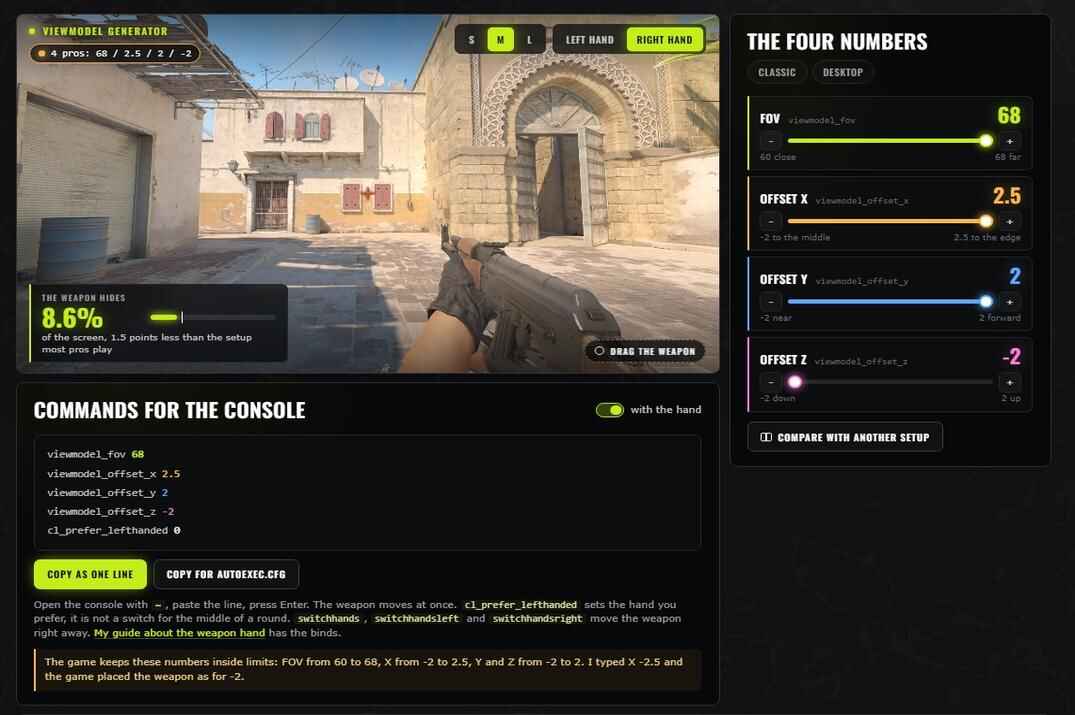
- Move the four sliders under the scene, or grab the weapon with the mouse and drag it. Dragging sideways changes X, dragging up and down changes Z.
- Watch The weapon hides in the corner of the scene. It is the share of the screen behind the weapon and your hands.
- Press Copy as one line.
- In the game open the console with
~, paste the line and press Enter. The weapon moves at once, no restart.
The page starts by itself: until you touch something, the scene walks through the most common pro setups. The first click stops the show and the weapon is yours.
- Classic, Desktop
- The two presets of the game. A good place to start from before fine tuning.
- Compare with another setup
- Puts a second setup over yours as a blue see-through ghost, so the difference is visible without switching back and forth.
- Copy for autoexec.cfg
- The same commands as a block for a config file, one per line.
- Copy link
- A link that opens this page with your setup. Handy for sending to a teammate.
CS2 Viewmodel Commands
What each of the four numbers does, and how far the game lets it go
| Command | From | To | What it does |
|---|---|---|---|
viewmodel_fov |
60 | 68 | A zoom of the weapon. 60 brings it close and big, 68 pushes it away and makes it smaller. |
viewmodel_offset_x |
-2 | 2.5 | Sideways. A higher number moves the weapon away from the middle of the screen. |
viewmodel_offset_y |
-2 | 2 | Forward and back. A higher number pushes the weapon away from you. |
viewmodel_offset_z |
-2 | 2 | Up and down. A lower number drops the weapon to the bottom of the screen. |
A number past the limit does not break anything, the game just stops at the edge. I typed viewmodel_offset_x -2.5 and the weapon stood exactly where it stands at -2. he FOV used to go down to 54. Since 7 May 2026 the lowest value is 60, and the old Couch preset with its 54 is gone.
Two things are worth knowing before you start moving sliders:
- The far end barely moves. The offsets shift the stock and your hands a lot and the front sight almost not at all. That is plain perspective: what is close to the eye travels further on the screen.
- None of this touches the game itself. Recoil, spread and the place the bullets go stay the same. Bullets fly from the middle of the screen, not from the barrel you see. The viewmodel changes only what is in your way.
So the whole job comes down to one trade. A weapon low and to the side leaves more of the screen free. A weapon close and high looks better and gets in the way. In my scene with an AK-47 the Classic preset hides 10.1% of the screen and Desktop 9.9%. The numbers change a little with the weapon.
CS2 Pro Viewmodel Settings
Most of them agree
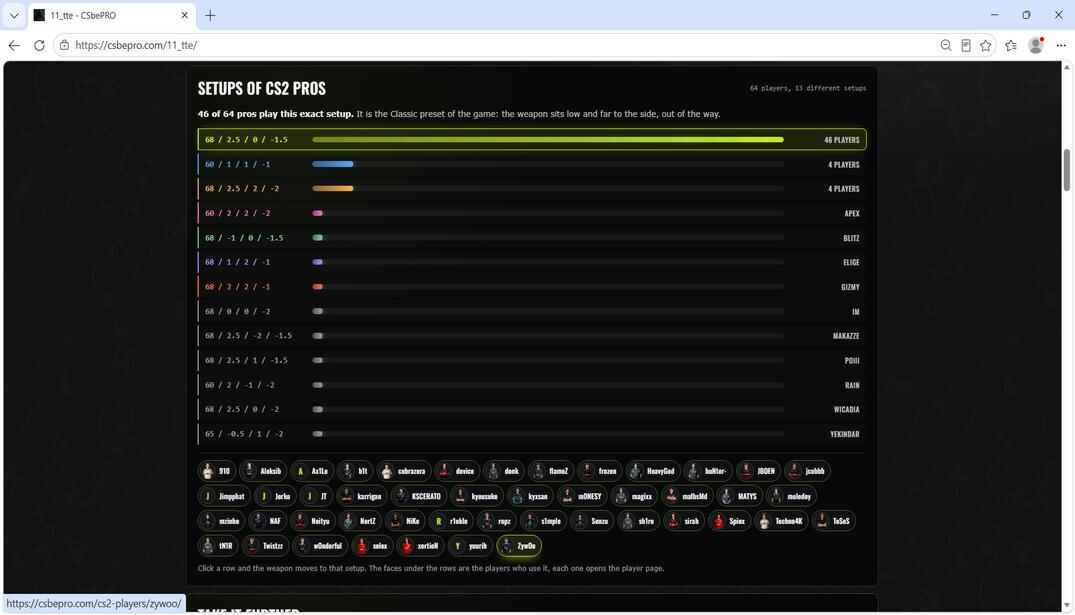
There is no zoo of settings here: about seven out of ten players in my CS2 pro settings list play the same four numbers.
| FOV / X / Y / Z | Players | Notes |
|---|---|---|
| 68 / 2.5 / 0 / -1.5 | Most | The Classic preset. donk, ZywOo, NiKo, m0NESY, s1mple, ropz and most of the rest. |
| 60 / 1 / 1 / -1 | A few | The Desktop preset. FalleN, Magisk, woxic, XANTARES. |
| 68 / 2.5 / 2 / -2 | A few | Classic pushed forward and down as far as the game allows. It hides 8.6% of the screen, the least of the three. |
| Other setups | One each | apEX, bLitz, EliGE, rain, YEKINDAR and five more play numbers nobody else in the list uses. |
Click a row in the tool and the weapon glides to that setup. Under the rows are the faces of the players who use it, and each face opens the player's page with the rest of the settings.
The line above the rows tells you where you stand: how many pros play your exact numbers, or, if nobody does, which setup is the closest.
A popular setup is a safe start, nothing more. If Classic still feels wrong after a week of playing, it is wrong for you, whatever the table says.
Left Hand or Right Hand
One switch on the scene, one extra line in the commands
Left hand and Right hand in the corner of the scene move the weapon to the other side. The game does the same thing: I compared screenshots, and the left hand is the right one mirrored. The four numbers keep their meaning, X still moves the weapon towards its own edge of the screen.
- cl_prefer_lefthanded
- The hand you prefer. 1 is left, 0 is right. It is a setting, not a switch for the middle of a round. The tool adds this line to the commands, and the with the hand switch takes it out.
- switchhands, switchhandsleft, switchhandsright
- Move the weapon right now: the first swaps hands, the other two put it in the named hand.
- The H key
- Swaps hands in the middle of a round.
The hand matters more than it seems. The weapon covers one bottom corner of the screen, and what stands behind it you do not see. That is why some players swap hands depending on the angle they hold. The binds for that, one key per hand and a hand per weapon slot, are in my guide on how to switch the weapon hand in CS2.
How Accurate Is the Viewmodel Preview?
Measured on screenshots from the game, not drawn by eye
The weapon in the scene is cut from my own screenshots: an AK-47 on Dust 2, 1920 by 1080. I took 29 of them at different settings and measured how every part of the weapon moves when one number changes. The tool repeats that movement.
Then I checked it the honest way. Two screenshots were kept out of the measuring, the tool was asked to predict them, and the weapon landed within 2 pixels of where the game put it.
Where it is less exact:
- Z above zero. A raised weapon shows the stock and the right glove, and those I could only shoot at a hard angle. The place is right, the fine detail is softer than in the game.
- The left hand. The position is exact, the light on the weapon in the game is a little different.
- Other weapons. The scene has the AK-47 only. Every weapon follows the same four numbers, but a pistol or an AWP covers a different share of the screen.
- Other screens. The scene is 16:9. On a 4:3 stretched picture the weapon looks wider.
The share of the screen under The weapon hides is counted from the picture you see: every pixel of the weapon and the hands against the whole frame. The white mark on its bar is the setup most pros play, so one glance tells whether you are above or below it.
The viewmodel is one piece of how the game feels in the hand. The other one is the mouse: my CS2 Sensitivity Converter shows your sensitivity among the same players.
Viewmodel Generator FAQ
Short answers to the questions people ask most
Is the viewmodel generator free?
Yes. No sign-up, no account, nothing to install.
What is the best viewmodel for CS2?
The one most pros play is viewmodel_fov 68, viewmodel_offset_x 2.5, viewmodel_offset_y 0, viewmodel_offset_z -1.5. About seven out of ten players in my list use it. It keeps the weapon low and to the side.
What are the viewmodel limits in CS2?
viewmodel_fov goes from 54 to 68, viewmodel_offset_x from -2 to 2.5, viewmodel_offset_y and viewmodel_offset_z from -2 to 2. A number past the limit is cut to the limit.
Does the viewmodel change recoil or accuracy?
No. Bullets fly from the middle of the screen whatever the weapon looks like. The viewmodel changes only how much of the screen the weapon covers.
How do I move the weapon to the left hand in CS2?
Press H in the game, or type switchhandsleft in the console. cl_prefer_lefthanded 1 sets the left hand as the preferred one.
How do I use the commands?
Press Copy as one line, open the console in the game with the ~ key, paste and press Enter. The weapon moves at once.
Why does viewmodel_offset_x -2.5 not work?
The game stops at -2. I typed -2.5 and the weapon stood exactly where it stands at -2. To the other side the limit is 2.5.
Is the viewmodel the same for every weapon?
The four numbers apply to every weapon at once. Each weapon has its own shape, so the same numbers cover a different share of the screen with a pistol, a rifle or an AWP.
More CS2 Tools
Other CS2 tools on this site first, then the ones for CS 1.6 and Steam.
- // live statsCS2 Player CountHow many people have CS2 open right now, checked every 5 minutes, with peaks and charts.CS2open โ
- // live statsCS2 Community ServersReal players on CS2 community servers, fakes filtered out: servers, maps, modes and countries.CS2open โ
- // generatorCS2 Crosshair GeneratorBuild a crosshair and take it to the game as a share code or console commands.CS2open โ
- // generatorCS2 Binds GeneratorPick keys and what they do, get the bind lines ready to paste.CS2open โ
- // generatorCS2 Config GeneratorChoose your settings and get an autoexec.cfg you can drop into the game folder.CS2open โ
- // inventoryInventory ValueWhat a public CS2 inventory is worth at current prices, and which items make up the number.CS2open โ
- // demo parserCS2 SteamID ExtractorDrop a CS2 demo, get every player's SteamID64 with their nickname.CS2open โ
- // recoil trainerCS2 Recoil TrainerCS2 recoil trainer in the browser: 16 weapons with their real spray patterns and fire rates, a ring to follow and a score after every burst.CS2open โ
- // damage calculatorCS2 Damage CalculatorPick a weapon, the armour, the distance and the hit zone and see the damage, the hits to kill and the time to kill in CS2. With a damage by distance chart.CS2open โ
- // lookupSteamID LookupAny ID or profile link in, every format out, plus bans, account age, hours and what they play now.CS 1.6 ยท CS2open โ
- // test yourselfAim TestClick the targets and see how fast and how accurate your aim is.CS 1.6 ยท CS2open โ
- // test yourselfReaction TestClick the moment it changes and get your reaction time in milliseconds.CS 1.6 ยท CS2open โ