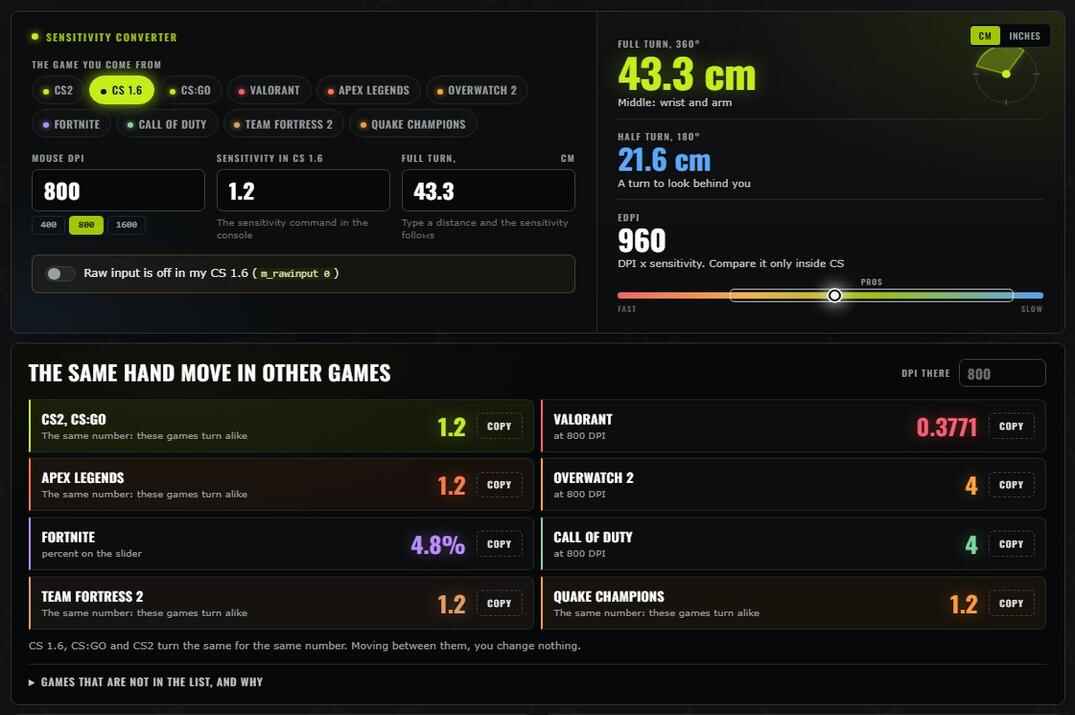
CS2 Sensitivity Converter showing DPI, sensitivity, cm/360, eDPI, and converted mouse settings for Valorant, Apex Legends, Overwatch 2, and other games

CS2 Sensitivity Converter

The same hand in CS 1.6, CS2, Valorant and other shooters, with cm for a full turn and eDPI

A sensitivity number means nothing outside its own game. 2 in CS2 and 2 in Valorant are two different hands. What stays the same everywhere is the distance the mouse travels on the pad for one full turn, and this converter is built around that distance: it keeps the move of your hand and gives the number each game needs for it.

It works for Counter-Strike 2, CS 1.6, CS:GO and seven other shooters. It also shows your turn on a mousepad drawn to scale, lets you feel the sensitivity with a captured mouse, and puts your number next to the pros.

Sensitivity converter
The game you come from
Full turn, 360ยฐ
Half turn, 180ยฐ
eDPI

The Same Mouse Movement in Other Games

Games that are not in the list, and why
  • Rainbow Six Siege: every scope has its own slider, and a hidden multiplier in the game settings file changes all of them. One number can't carry over.
  • PUBG: separate sensitivity for hip fire, aiming and each scope, and the turn depends on the field of view you set.
  • Escape from Tarkov: armour, helmet and the ergonomics of the weapon slow your turn. The same setting gives a different turn with different gear.
  • Rust: the game changes with engine updates, and a number that was right can be off after a patch.
  • Halo Infinite, Battlefield 2042: the sources I checked give different numbers for them, so I left them out until I can test them myself.

For these games use the distance instead: set the sensitivity in the game, measure how far the mouse goes for a full turn, and match it to the Full turn number above.

On your mousepad

Feel it

Click to take the mouseEsc gives it back

The view turns the way CS turns at this sensitivity. Move the mouse from one side of the pad to the other and read how far you turned.

In the scope

No scope
AWP, first zoom

This number multiplies the sensitivity while you look through a scope. CS2 starts at 1, CS 1.6 at 1.2.

The converter carries the move of your hand, not the picture. Games have different fields of view, so with the same full turn a target can cross the screen at a different speed. Raw input, acceleration and DPI are in my mouse settings guide.

How to Convert Your Sensitivity

Enter your DPI and sensitivity to get matching settings

CS2 Sensitivity Converter showing DPI, sensitivity, cm/360, eDPI, and converted mouse settings for Valorant, Apex Legends, Overwatch 2, and other games
Convert CS2 sensitivity to other games while keeping the same mouse movement and cm/360 distance
  1. Pick the game you come from.
  2. Type the Mouse DPI. It is in the software of your mouse, and the buttons under the field set 400, 800 or 1600.
  3. Type the Sensitivity from that game. In CS it is the sensitivity command in the console.
  4. Read the list below: every game with the number that gives the same turn. Copy takes a number to the clipboard.

The three fields at the top are tied together. Type a distance into Full turn, 35 cm for example, and the sensitivity changes to match it. That is the way to go when you know how you want the mouse to feel and need the number for it.

A new game
Clicking another game at the top keeps your hand and shows the sensitivity for that game in the field.
A new DPI
The quick DPI buttons keep your hand too: go from 400 to 800 and the sensitivity halves. DPI there above the list does the same for the game you move to.
cm or inches
The switch in the corner of the big numbers.

The page remembers your numbers in this browser. Copy link gives a link that opens with them on any other device.

CS 1.6 to CS2 Sensitivity

The same number, with one exception

CS 1.6, CS:GO and CS2 turn the view by the same angle for the same mouse move. Sensitivity 2 at 400 DPI is a full turn of 52 cm in all three. Moving from one to another, you change nothing.

The exception is an old CS 1.6 setup with raw input off, m_rawinput 0. There the game takes the mouse through Windows, and the pointer speed slider multiplies it: notch 6 of 11 leaves it alone, notch 8 doubles it. CS2 always reads the mouse raw. Pick CS 1.6 in the converter, switch on Raw input is off, set your notch, and the list gives the CS2 number that feels the same.

The scope is the second thing to carry over. zoom_sensitivity_ratio multiplies the sensitivity while you look through a scope. A fresh CS 1.6 has it at 1.2, CS2 at 1. Set the same value in both games and the AWP turns the same. The In the scope block shows the full turn with an AWP zoomed in, and most pros in my list keep the ratio at 1.

Raw input, acceleration and the rest of the mouse setup are in my mouse settings guide. To put the number straight into a config, the CS 1.6 Config Generator button under the tool opens my config generator with this sensitivity already set.

CS2 Sensitivity Conversion for Other Games

The numbers behind the converter, and the games it leaves out

Every game turns the view by a fixed angle for one count of the mouse at sensitivity 1. Know that angle for two games and the conversion is one multiplication.

Game Degrees for one count From a CS number
CS 1.6, CS:GO, CS2 0.022 The same number
Apex Legends 0.022 The same number
Team Fortress 2 0.022 The same number
Quake Champions 0.022 The same number
Valorant 0.07 Divide by 3.18
Overwatch 2 0.0066 Multiply by 3.33
Call of Duty 0.0066 Multiply by 3.33
Fortnite 0.005555 for 1% of the slider Multiply by 3.96, the answer is in percent

I checked each of these against two independent lists, and only the games where both agree are in the tool.

Some popular games are not in the list on purpose. One multiplier would give a wrong number there:

  • Rainbow Six Siege: every scope has its own slider, and a hidden multiplier in the settings file changes all of them.
  • PUBG: separate sensitivity for hip fire, aiming and each scope, and the turn depends on the field of view you set.
  • Escape from Tarkov: armour, a helmet and the ergonomics of the weapon slow the turn. The same setting turns differently with different gear.
  • Rust: the turn has changed with engine updates, so a number that was right can be off after a patch.

cm/360, eDPI and Your Mousepad

What the three big numbers mean

Full turn, 360ยฐ
How far the mouse travels for one full turn. For CS it is 41,564 divided by DPI and by sensitivity: 800 DPI at 1.2 is 43.3 cm. Under the number the tool says what kind of aim it is, from wrist only to big arm moves.
Half turn, 180ยฐ
The move you make to look behind you. If it does not fit on your pad in one go, you lift the mouse in the middle of a fight.
eDPI
DPI multiplied by sensitivity. 800 at 1.2 and 400 at 2.4 are both 960. It compares players inside one game only.

The On your mousepad block draws the turn on a pad of your size: small, medium, large or a desk mat. A line longer than the pad means a lift in the middle of a turn.

Among CS2 pros puts your eDPI on a line with the players from my CS2 pro settings pages. It says how many of them play faster and slower than you and shows the four closest. Click a dot and the converter loads that player's DPI and sensitivity, so you can see their turn on your pad and try it in the view.

Test Your Sensitivity Before Playing

A view that turns like CS, and two places to test the hand

Click the Feel it window and it takes the mouse, the way a game does. The view uses the same sensitivity calculations as CS. Actual mouse movement may vary depending on your browser and system settings. Marks stand every 15 degrees, and the line under the view counts how many degrees one move of your hand gave and how many centimetres of pad it took. Esc gives the mouse back.

  • Sweep from one edge of the pad to the other. A comfortable sweep should give at least 180 degrees.
  • Flick between the coloured dots. If you overshoot every time, the number is too high for you.
  • Change the sensitivity and try again. The view follows the fields at once.

It needs a computer with a mouse, and Chrome or Edge give the raw mouse the way the game reads it. In a browser that does not, the tool says so: Windows pointer speed gets mixed in and the turn can differ.

From there the buttons under the tool go further. CS2 Recoil Trainer opens with your sensitivity already in, so the spray patterns pull the way they do in the game. CS2 Aim Test measures how fast and how clean the hand is.

Sensitivity Converter FAQ

Short answers to the questions people ask most

Is the sensitivity converter free?

Yes. No sign-up, no account, nothing to install.

Is CS 1.6 sensitivity the same as CS2?

Yes. Both games turn 0.022 degrees for one count of the mouse at sensitivity 1, so the same number with the same DPI gives the same turn. The one exception is CS 1.6 with raw input off: there the Windows pointer speed multiplies the mouse, and the converter counts it in.

How do I convert CS2 sensitivity to Valorant?

Divide it by 3.18. A CS2 sensitivity of 2 is 0.629 in Valorant at the same DPI. Going the other way, multiply the Valorant number by 3.18.

What is eDPI?

DPI multiplied by sensitivity. 800 DPI at 1.2 and 400 DPI at 2.4 are both 960 and turn the same. eDPI compares players inside one game only: 960 in CS2 and 960 in Valorant are very different hands.

What is cm/360?

The distance the mouse travels on the pad for one full turn in the game. It is the one number that means the same in every game, which is why the converter is built around it.

What is a good sensitivity for CS2?

There is no single one, but the pros in my list sit between 400 and 1600 eDPI, most of them from 600 to 1200. That is a full turn of about 35 to 70 cm. The pro strip in the tool shows where your number lands.

Why does the same sensitivity feel different in another game?

The converter matches the move of the hand, not the picture. Games use different fields of view, so with the same full turn a target can cross the screen faster or slower.

Does DPI change my sensitivity?

It changes the turn. Double the DPI and the same sensitivity turns twice as fast. Pick the new DPI with the quick buttons in the tool and it gives you the sensitivity that keeps your hand the same.

More CS2 Tools

Other CS2 tools on this site first, then the ones for CS 1.6 and Steam.

All CS2 tools โ†’

Leave a Reply

Your email address will not be published. Required fields are marked *