
SteamID Lookup & Converter
Paste a profile link, a trade link or any SteamID. Get every format back, and what Steam knows about the account
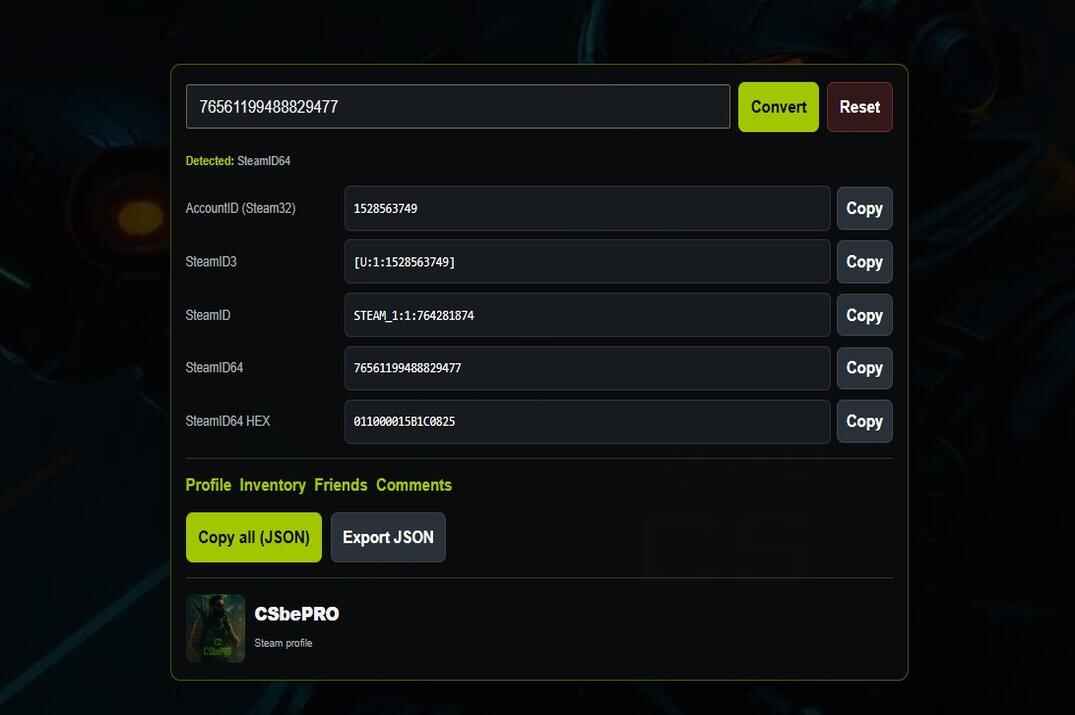
The tool works out what you pasted on its own - no dropdown, no picking the format first. Plain IDs are converted right in your browser. A custom URL like steamcommunity.com/id/name goes to Steam first, because only Steam knows which account sits behind a name.
Under the formats comes the player card: bans, account age, Steam level, hours in CS 1.6 and CS2, and what the player is doing right now. All of it is public data from the Steam Web API. No login, and I keep no record of who looked up whom. Premier rating, rank and K/D are not in the Steam API, so they are not here either.
What You Can Paste
Eight kinds of input, one account behind all of them
- Profile link
-
steamcommunity.com/profiles/76561197960287930- the SteamID64 is already in the link./profiles/[U:1:22202]works too, Steam itself accepts that form. - Custom URL
-
steamcommunity.com/id/gabelogannewell, or just the name. This is the only input that needs Steam: the tool asks it which account owns the name. It is the name in the address, not the display name on the profile. - Trade link
-
…/tradeoffer/new/?partner=22202&token=…-partneris the AccountID, everything else follows from it. The token is ignored, and the link is converted in your browser, it is not sent anywhere. - SteamID
-
STEAM_0:0:11101as CS 1.6 prints it, orSTEAM_1:0:11101from Source games. Both are the same account. - SteamID3
-
[U:1:22202], with or without the brackets. - SteamID64
-
17 digits starting with
7656119. - AccountID
-
Up to 10 digits. It is the friend code in Steam and the folder name in
Steam/userdata/. A custom URL made only of digits gets read as an AccountID - paste the full link for those. - Hex
-
01100001000056BA, with or without0x- the SteamID64 written in hex. - Not an account
-
STEAM_ID_LAN,STEAM_ID_PENDING,VALVE_0:1:…,BOT,HLTVand the8556…numbers from Reunion are what CS 1.6 servers print for players without a Steam account. The tool says so instead of making something up.
The Formats
Six ways to write one number, each stuck in the place it was born
Steam has collected these over twenty years. The legacy string lives on in GoldSrc servers, the bracketed one in Source logs, the 17-digit number everywhere modern. Under all of them sits one AccountID, a plain 32-bit number. The tool shows every format of it in one go.
| Format | Looks like | Where you see it |
|---|---|---|
| SteamID64 | 76561197960290419 |
Profile links, the Steam Web API, inventory sites, most tools |
| SteamID | STEAM_0:1:12345 |
CS 1.6 and other GoldSrc servers: status, ban lists, AMX Mod X admin files |
| SteamID (Source) | STEAM_1:1:12345 |
Source games and SourceMod admin files |
| SteamID3 | [U:1:24691375] |
Source and Source 2 consoles and logs, CS2 included |
| AccountID | 24691375 |
Friend code in Steam, partner= in trade links, the userdata folder |
| Hex | 0110000100006073 |
The SteamID64 in hex, some logs and older tools |
How They Connect
Take AccountID 24691. Odd, so the middle digit of the SteamID is 1, and half of it rounded down is 12345: STEAM_0:1:12345. SteamID3 just wraps it: [U:1:24691]. SteamID64 adds it to a fixed base, 76561197960265728 + 24691 = 76561197960290419. Hex is that last number in base 16.
The first digit of the SteamID is the universe. GoldSrc writes 0, Source games write 1, and both mean the same public universe. That is why CS 1.6 and SourceMod show different strings for one person - the tool gives you both, so you can paste the right one into an admin file.
Where each format came from, how the maths works and where to find your own IDs - more on that in my Steam ID guide.
The Player Card
What Steam tells about an account, and how fresh it is
- Status
- Online, offline or in game, as Steam shows it to anyone. The frame around the avatar is lime when the player is in a game and blue when they are online.
- Playing now
- The game, and the server when Steam shows it. For a CS 1.6 server you get its page in CS 1.6 Steam Server Stats with real players over time, CS 1.6 Server Info with who is on it right now, and a Join button. CS2 matchmaking runs through Valve's relay network, so there the server is never shown.
- Bans
- VAC bans, game bans, trade and community bans, and how many days since the last one. Game bans are the ones a game gives on its own, CS2 Overwatch bans count there. Steam gives the numbers, not the game a ban came from.
- Account age
- From the date the account was created. Private profiles usually hide it.
- Steam level
- Badges and XP, the number in the corner of every profile.
- Hours
- CS 1.6 (appid 10) and CS2 (appid 730): total, the last two weeks and when it was last played. CS:GO and CS2 are one app in Steam, so the CS2 hours include CS:GO. CS 1.6 played on a non-Steam client never reaches Steam at all.
- Private profile
- Hours and the creation date are hidden by the owner, the card says so. Bans are shown anyway - Steam gives those for every account, private or not.
- How fresh
- Steam answers are kept for a while: status 2 minutes, bans 6 hours, hours 1 hour, level a day. A ban given ten minutes ago can take a few hours to show up here. When Steam doesn't answer, the card shows the last copy with a Delayed badge.
The inventory button opens CS2 Inventory Value with the SteamID already filled in. It doesn't start on its own - press the button there, and only if the inventory is public.
Checking a List
A whole server at once
Switch to A list and paste up to 100 lines. Each line can be any of the inputs above, and lines that are not an ID on their own are searched for one. So you can paste the whole status output from a CS 1.6 server console, or a chunk of a log, and the tool picks the IDs out of it.
Every account gets one row: SteamID64, SteamID, name, status and bans. The filters on top show only the banned, the private or the ones in game. The list goes out as CSV or as plain IDs, and the page address keeps the list, so you can send it to another admin.
Custom URL names cost one question to Steam each, so a list takes ten of them at most. Profile links and IDs have no limit inside the 100.
For players from a recorded game, the CS 1.6 Demo Analyzer and the CS2 SteamID Extractor read every ID out of a demo file. The Demo Analyzer links each player straight here.
Where to Find a SteamID
Four places it is always lying around
Your own profile
- Open your profile on steamcommunity.com and copy the address.
- In the Steam app the address bar is off by default: Steam → Settings → Interface → Display web address bars when available.
- Paste the link above.
A custom URL in the link is fine, the tool asks Steam which account it is.
A player on a CS 1.6 server
- Open the console and type
status. - Every line has the player's
STEAM_0:X:Y. - Paste one line, or the whole output into A list.
On servers with non-Steam players some IDs are made up by the server. Those have no Steam account.
A player in CS2
- Open the player's Steam profile - from the scoreboard in the game, or from your friends list.
- Copy the address of the profile.
- Paste it here.
For everyone in a match at once, take the demo to the CS2 SteamID Extractor.
A folder on your PC
- Open
Steam/userdata/. - Each folder name there is an AccountID - one per account that ever logged in on this PC.
- Paste the number to see whose it is.
Handy for working out which account a config folder belongs to.
Limits
What the Steam API doesn't give, and what I don't do
- No search by display name. Steam's API has no such search, only custom URLs can be resolved. If someone is called "s1mple fan" on their profile, that is not something to look up.
- No Premier rating, rank, K/D or match history. The Steam Web API doesn't have them for CS2, and the old personal stats there are left over from CS:GO. Leetify and FACEIT build them from match data.
- Private profiles hide their hours, and usually the creation date. Nothing can be done about that from outside.
- Non-Steam players. On servers that let non-Steam players in, a
STEAM_0can be made up by the server or the client. Such an ID may have no account behind it, or it may point to a stranger’s account that never played there. - Delays. Answers are cached, see How fresh. A fresh ban or a new name can take a while.
- Limits. A dozen Steam checks a minute per visitor, more than enough by hand. Lookups of an account checked a minute ago don't count, they come from the cache.
SteamID FAQ
Short answers
What is the difference between SteamID, SteamID3 and SteamID64?
Three ways of writing the same account. STEAM_0:1:12345 is the old one, still printed by CS 1.6 servers. [U:1:24691] is what Source and Source 2 games use in the console and logs. The 17-digit number starting with 7656119 is what Steam puts in profile links. Under all of them sits one AccountID - see How They Connect.
STEAM_0 or STEAM_1 - which one is right?
Both. The first digit is the universe, GoldSrc writes 0 and Source writes 1 for the same public universe. Use STEAM_0 in CS 1.6 admin files and ban lists, STEAM_1 in SourceMod.
How do I find my own SteamID64?
Copy the address of your profile and paste it in the form above. In the Steam app the address bar has to be switched on first: Steam → Settings → Interface → Display web address bars when available.
Can I find someone by their nickname?
Only by the custom URL name, the part after steamcommunity.com/id/. The display name on the profile can't be searched - Steam has no such search in its API, and many people share the same name anyway.
Can a trade link be converted to a SteamID?
Yes. The partner number in the link is the AccountID, every other format comes from it. The token is only for trade offers and plays no part. The link is converted in your browser and is not sent anywhere.
Does it show Premier rating or rank?
No. Steam's Web API has no rank, rating or K/D for CS2. I may add the Premier rating for players in Valve's public leaderboard later, that is the only official source of it.
Why does CS2 show so many hours?
CS:GO and CS2 are one app in Steam (appid 730), so the hours of both games add up in one number. There is no way to split them.
Why are the hours hidden?
The owner made the profile or its game details private. Bans are still shown, Steam gives those for every account.
Does a VAC ban here mean they cheated in CS?
Not necessarily. Steam gives the number of VAC bans and game bans, not the game they came from. A VAC ban from another game shows up the same way.
A STEAM_0 ID from my server shows nobody, or a stranger. Why?
On servers that let non-Steam players in, the server or the client can make the ID up. Then there is either no account behind it, or the account of someone who never played there. Real Steam players on such servers have their real ID.
Does the tool need my Steam login, or keep what I look up?
No login. Answers from Steam are kept for a few minutes to a few hours so the same account isn't asked for again, then they expire. There is no list of who looked up whom.
More Steam Tools
The other tools on this site that work with Steam: accounts, demos, inventories and live server numbers
- // demo parserCS2 SteamID ExtractorDrop a CS2 demo, get every player's SteamID64 with their nickname.CS2open →
- // demo parserCS 1.6 Demo AnalyzerScoreboard, rounds, kill feed, chat, SteamIDs and a 2D replay from a GoldSrc demo, in the browser.CS 1.6open →
- // inventoryInventory ValueWhat a public CS2 inventory is worth at current prices, and which items make up the number.CS2open →
- // server queryCS 1.6 Server InfoWho is on a server right now, its map, cvars, plugins and ping from other countries.CS 1.6open →
- // live statsCS 1.6 Steam Server StatsReal players on every CS 1.6 server in the Steam list, fake farms filtered out, with history.CS 1.6open →
- // live statsCS2 Player CountHow many people have CS2 open right now, checked every 5 minutes, with peaks and charts.CS2open →
- // live statsCS2 Community ServersReal players on CS2 community servers, fakes filtered out: servers, maps, modes and countries.CS2open →