CS2 Sniper Scope Inaccuracy Indicator Explained
One of the biggest visual changes in the October 1 update was the introduction of a dynamic inaccuracy indicator inside the sniper scope. Instead of the clean, static crosshair players were used to, the AWP and Scout now show a subtle moving circle that reacts to your movement, stance, and weapon accuracy. The idea behind this change was to give players a clearer understanding of when their shot is fully accurate, especially after peeking or quick-switching.
In theory, this helps new players understand the timing of scoped shots. In practice, it adds visual noise to a weapon that demands precision. The indicator expands and contracts depending on weapon spread, which can feel distracting when you're holding tight angles or waiting for the perfect moment to fire.
Why Players Want the Old Scope Back


For more than ten years, the classic AWP scope barely changed. It was simple, clean, predictable, and unobtrusive - exactly what you want when your entire shot depends on millisecond reactions and pixel-perfect alignment. The old design didn’t move, didn’t animate, and didn’t draw your eye away from the target.
When the new indicator was introduced, many players immediately felt something "off". Even if the circle is subtle, any movement in the scope can break focus, especially during fast peeks, jiggle holds, or clutch situations. Much of players prefer consistency over "helpful visuals", which is why the overwhelming feedback after the update was the same: the scope didn’t need changing.
For long-time AWP users, the new version simply doesn’t feel natural - and that’s why restoring the old scope became a top request the moment the patch went live.
What Exactly Changed in the Rendering System
The update didn’t just add a new element - it changed how the entire scope overlay is rendered. Valve updated the pipeline responsible for drawing sniper scopes, allowing new effects like the animated inaccuracy circle and future visual upgrades. This came with trade-offs: the scope is now tied to the accuracy system in real time, which is why the new animation reacts instantly to your movement.
This shift also means the old scope isn’t technically the default anymore. The new one is layered differently, uses a different transparency pattern, and dynamically refreshes based on spread values. Because of these changes, the classic static scope doesn’t simply "exist underneath" - it has to be manually restored using a console command that disables the new inaccuracy overlay.
How to Get the Old AWP Scope Back in CS2

Restoring the old sniper scope in CS2 is surprisingly simple once you know where to look. In reality, it's still there - it's just covered by a new element. By disabling it, you instantly get the old, clean, familiar AWP and Scout scope. Below are the two fastest and safest ways to restore classic zoom: through the console and through the settings menu.
Restore the Old AWP Scope with a Console Command
If you prefer direct control or already work with configs, this is the fastest method. All you need is a single command.
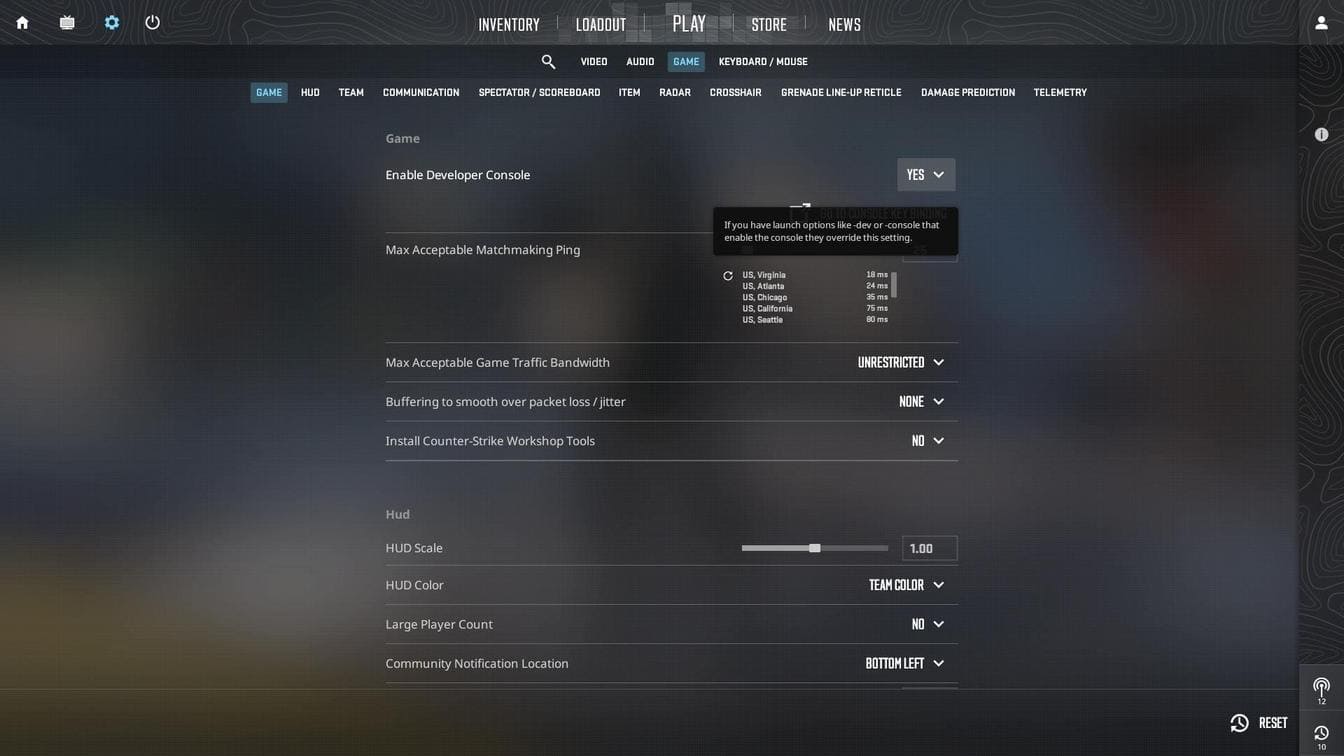
First, make sure the developer console is enabled:
- Open Settings -> Game -> Enable Developer Console -> Yes.
- Press ~ (default) in-game to open the console.
- Enter the command:
cl_sniper_show_inaccuracy 0

This command disables the new inaccuracy indicator entirely, revealing the old static scope underneath. The moment you zoom in, the scope will look exactly like it did before the update - clean, sharp, and without any moving visual elements.
If you ever want the new indicator back, just reverse it:
cl_sniper_show_inaccuracy 1This method works instantly and doesn’t require restarting the map or game.
Restore the Old AWP Scope in the Game Settings
If you prefer not to touch console commands, CS2 includes a built-in setting that does the exact same thing - it just takes a few clicks to find.

- Open Settings and navigate to Game
- Scroll to the Sniper Sights section
- Find "Show Scoped Sniper Rifle Inaccuracy" and set it to No
Once disabled, the scope immediately switches back to the classic version without any extra steps. This is the most user-friendly option and works even if your console is disabled.
Old AWP Scope in CS2 FAQ

Does restoring the old AWP scope give any gameplay advantage?
No. It only changes visuals. Accuracy, timing, and spread remain exactly the same.
Will Faceit or Premier flag this command as cheating?
No. cl_sniper_show_inaccuracy is an official, approved client-side setting
Do I need to restart CS2 after using the command?
Usually no, but if the scope doesn’t change immediately, restarting the map can help.
Does this command affect the Scout (SSG 08) as well?
Yes. Both AWP and SSG 08 use the same sniper scope system.
Why do some players prefer the new scope?
The inaccuracy indicator helps beginners time their shots, especially after moving.
Can I save this setting in autoexec?
Yes. Add cl_sniper_show_inaccuracy 0 to your autoexec.cfg and it will load automatically. You do not need to put autoexec.cfg into the launch options - it is a useless action because your config will load twice.