CS2 Legal Wallhack Commands - Safe Scripts and Binds
Introduction
In CS2, wallhack usually sounds like cheating, but Counter-Strike 2 also includes built-in developer tools that can create wallhack-like overlays. These commands only work with sv_cheats 1 enabled and can be used in offline sessions or on dedicated servers with cheat mode enabled - but not in official matchmaking.
With commands like cl_ent_bbox and cl_player_proximity_debug, you can see hitbox overlays and player distance markers through walls. That makes them useful for checking crosshair placement, studying movement, testing smoke coverage, and understanding sound range in controlled practice.
In this guide, I’ll explain what legal wallhack commands in CS2 actually are, which commands are useful, and how to create simple binds and toggle scripts to use them faster.
What Is a Legal WallHack in CS2?
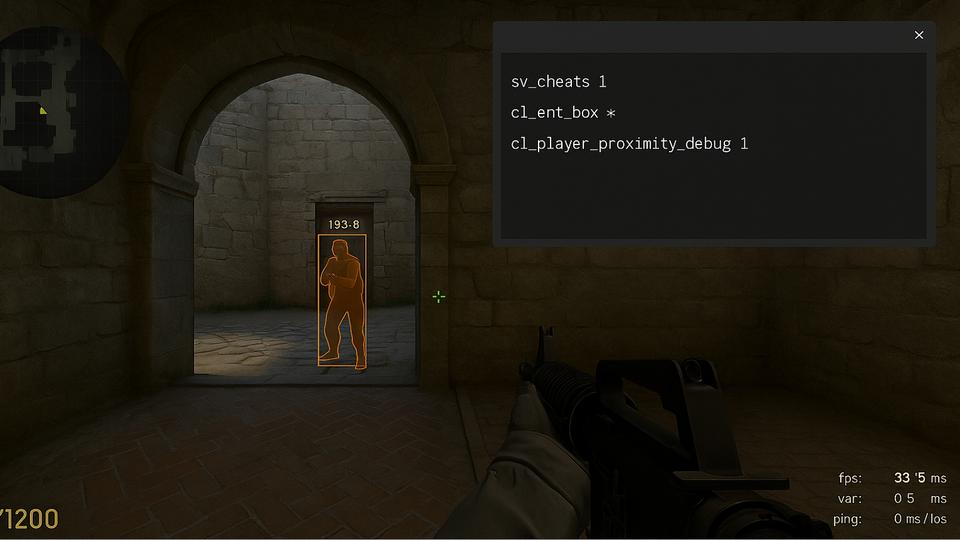
A "legal wallhack" in Counter-Strike 2 isn’t some shady third-party cheat - it’s a set of developer commands built right into the game. When you enable sv_cheats 1 in an offline lobby or custom server, you can activate overlays that look a lot like wallhacks: glowing hitboxes, proximity numbers, or markers that stay visible through walls and smokes.
Here are these wallhack commands:
- cl_ent_bbox - draws boxes around players, weapons, and props.
- cl_player_proximity_debug - shows distance numbers near players’ legs.
Together, they give you a kind of x-ray vision for training. You can see exactly how models move, where hitboxes sit, and how close players are to each other - things you’d never notice in a normal match. These features don’t work online, but in practice sessions they’re incredibly powerful.
Why WallHack Commands Can Be Useful
Aim and crosshair placement. With hitbox boxes on, you can literally watch how models shift when players crouch, peek, or strafe - perfect for dialing in your aim and headshot angles.
Utility practice. Want to know if your smoke really blocks vision or how a flash hits an opponent? Wallhack commands let you test it without guesswork, since you can see enemies through walls.
Footstep awareness. Distance numbers from cl_player_proximity_debug show when footsteps become audible. This helps you understand sound mechanics and improve timing for rotations or sneaky plays.
Coaching and map study. Trainers, analysts, or even casual players making custom maps use these tools to explain strategies, check spacing, and refine setups.
These commands in CS2 aren’t about cheating - they’re about learning faster and smarter. They give you insights you can’t normally see, and those lessons stick with you when you go back into real matches. They’re also extremely valuable for map makers, modders, and developers, who use these overlays to test collision, check visibility, and fine-tune gameplay balance before content goes live.
Useful WallHack Commands for Training in CS2
Counter-Strike 2 includes a couple of built-in developer commands that create wallhack-style overlays. These tools become available when cheat mode is enabled in an offline session or on a server that allows it. The two main commands covered in this guide are cl_ent_bbox and cl_player_proximity_debug.
cl_ent_bbox - Hitbox Overlay
The cl_ent_bbox command draws wireframe boxes around in-game entities such as players, weapons, and even map props. These boxes remain visible through walls and smokes, giving you a clear look at how hitboxes line up in real time.
Command examples:
cl_ent_bbox * // draws boxes on all current entities
cl_ent_clear_debug_overlays // removes all overlay boxes
For a full breakdown of commands and syntax, see my detailed guide: Legal WallHack in Counter-Strike 2.
Why players use it: cl_ent_bbox is useful for checking hitbox placement, studying how player models shift during movement, and testing lineups or wallbang angles in practice. It gives you a clearer view of how models and hitboxes line up in real time.
cl_player_proximity_debug - Distance Indicators
The cl_player_proximity_debug command adds small numbers near players’ legs that update based on distance. These numbers remain visible even through walls, effectively showing you how close two players are to each other.
Command examples:
cl_player_proximity_debug 1 // turns it on
cl_player_proximity_debug 0 // turns it off
Why players use it: cl_player_proximity_debug helps you understand distance more clearly in practice. It can be used to test sound range, study spacing between players, and see how close movement or positioning changes from one angle to another.
How to Create Quick Wallhack Binds in CS2
Typing wallhack commands into the console every time gets old fast. That’s why most players and developers set up quick binds - one-key shortcuts that turn overlays on or off without retyping anything. In CS2, a bind is simply a console command linked to a key.
Example: Hitbox bind
bind "z" "sv_cheats 1; cl_ent_bbox *"
bind "x" "cl_ent_clear_debug_overlays; sv_cheats 0"
Press Z to show hitboxes, then X to clear them.
Example: Proximity numbers bind
bind "c" "sv_cheats 1; cl_player_proximity_debug 1"
bind "v" "cl_player_proximity_debug 0; sv_cheats 0"
Here C toggles distance numbers on, and V turns them off.
If you prefer, you can also use the toggle command to bind both actions to a single key:
bind "f" "toggle cl_player_proximity_debug"
Quick binds like these make "wallhack" commands far more practical. Instead of breaking your training flow, you can instantly switch overlays while practicing smokes, testing angles, or checking map spacing.
CS2 Wallhack Toggle Scripts
Quick binds are fine for basic on/off commands, but if you want something cleaner, toggle scripts are the way to go. With a simple alias setup, you can press one key to enable a wallhack overlay and press the same key again to disable it - no need for separate keys or extra typing.
Hitbox Toggle Script for CS2
alias toggle_boxes boxes_on
alias boxes_on "sv_cheats 1; cl_ent_bbox *; alias toggle_boxes boxes_off"
alias boxes_off "cl_ent_clear_debug_overlays; sv_cheats 0; alias toggle_boxes boxes_on"
bind "f" "toggle_boxes"
The first alias creates a new command called toggle_boxes. Press F once -> it enables sv_cheats 1 and draws hitbox boxes. Press F again -> it clears the overlays, disables cheats, and resets the toggle.
Proximity Numbers Toggle Script
alias toggle_numbers numbers_on
alias numbers_on "sv_cheats 1; cl_player_proximity_debug 1; alias toggle_numbers numbers_off"
alias numbers_off "cl_player_proximity_debug 0; sv_cheats 0; alias toggle_numbers numbers_on"
bind "g" "toggle_numbers"
Press G once -> distance numbers appear near player models. Press G again -> the numbers disappear and the script resets.
Hitboxes + Distance Numbers Toggle Script
alias toggle_boxes boxes_on
alias boxes_on "sv_cheats 1; cl_ent_bbox *; cl_player_proximity_debug 1; alias toggle_boxes boxes_off"
alias boxes_off "cl_ent_clear_debug_overlays; cl_player_proximity_debug 0; sv_cheats 0; alias toggle_boxes boxes_on"
bind "f" "toggle_boxes"
The first alias creates a new command called toggle_boxes. Press F once -> it enables sv_cheats 1, draws hitbox boxes, and shows distance numbers near player models. Press F again -> it clears the overlays, hides the numbers, disables cheats, and resets the toggle.
This combined script makes "wallhack commands" far more convienment. Instead of juggling two separate keys, you get a smooth one-key toggle for both overlays.
Run Your Scripts in CS2
Setting up a toggle or bind is only half the job – you also need to know how to load your scripts into CS2. There are several ways to do it, and each works a little differently:
- Custom config file. Place your commands in a separate .cfg file (e.g, mywh.cfg) and load it whenever you need with the
execcommand. - Console. For quick testing, just paste your script directly into the developer console. It works instantly, but resets once you restart the game.
- Launch options. Add
+exec mywh.cfgto your CS2 launch options in Steam so the script runs automatically every time the game starts. - autoexec.cfg. The most reliable long-term method. Put your wallhack toggles inside autoexec.cfg, and CS2 will load them on every launch without extra steps.
If you want step-by-step walkthroughs, check out these detailed guides:
- CS2 Config: How to Create, Load, and Manage CFG Files
- CS2 Config Location Guide 2026: Where are Config Files Stored?
- How to Reset All Settings in Counter-Strike 2
Together, they cover everything from quick console tests to permanent config setups, so you can run your scripts exactly the way you prefer.
Conclusion
Legal wallhack commands in Counter-Strike 2 are built-in developer tools that can help with practice, testing, and map analysis. With simple binds or toggle scripts, you can enable or disable overlays when needed and use them to study specific mechanics more clearly.
These commands are useful for checking hitbox placement, testing smoke coverage, reading distance markers, and understanding how players move through space. They can also help with demos, server testing, and custom practice setups where sv_cheats 1 is enabled.
Used correctly, they are not about cheating - they are about seeing how CS2 works "under the hood". They will not work in official matchmaking, but in offline sessions or on servers with cheat mode enabled, they can be a tool for learning and experimentation.
CS2 Legal Wallhack Commands FAQ
Are legal wallhack commands allowed in Competitive or Premier?
No. They only work with sv_cheats 1, which is disabled on official servers. You can use them offline, in custom matches, or on private servers where you have permissions.
Can I get banned for using legal wallhack commands in CS2?
No. These are official developer tools built into the game. Using them in offline servers or practice lobbies is completely VAC safe.
What’s the difference between a legal wallhack and a cheat?
A cheat is third-party software that gives you an unfair advantage online. Legal wallhack commands are part of CS2 itself, designed for testing, training, and - not for ranked matches.
How can wallhack commands help me train?
They let you see hitboxes through walls, check smoke and flash effectiveness, test crosshair placement, and understand footstep distances. It’s like having x-ray vision for practice sessions.
Are these commands useful for developers too?
Absolutely. Map makers and modders use them to check player collision, visibility, sound propagation, and spacing during level design.
Does r_drawothermodels 2 work as a wallhack command in CS2?
No. That command existed in CS:GO on the old Source engine, but it was not carried over into CS2’s Source 2 engine. If you try to use it in CS2, the console will just return Unknown command. For practice in CS2, the proper alternatives are commands like cl_ent_bbox (hitbox overlay), cl_player_proximity_debug (distance numbers), or spec_show_xray when watching demos..