Steam ID Guide: SteamID64, SteamID3, AccountID and How to Find Them

Table of Contents

A Steam ID is the permanent identifier behind every Steam account. Your profile name, avatar, and custom URL can change, but the Steam ID stays tied to the account and is used by Steam, game servers, APIs, trade links, bans, admin lists, and third-party tools.

This guide explains what a Steam ID is, how SteamID, SteamID3, SteamID64, AccountID, and Hex ID differ, how to convert between formats, and how to find your Steam ID in Steam, Counter-Strike 1.6 or Counter-Strike 2, profile URLs, trade links, and local Steam folders.

What is a Steam ID and Steam ID Formats

A Steam ID is a unique identifier tied to a Steam account. Profile names, avatars, and custom URLs can change, but the identifier behind the account stays the same. That makes Steam IDs useful for Steam profiles, game servers, bans, admin access, support checks, trade links, APIs, and third-party tools.

Steam IDs can appear in several formats depending on where they are used. Older Counter-Strike and Source-based games often show the classic SteamID format, while Steam Community pages, CS2 tools, server systems, and web APIs usually rely on SteamID64, SteamID3, or AccountID values.

SteamID / Steam2 ID

This is the classic Steam ID format used in older Valve games and server systems, including Counter-Strike 1.6, Dota2 and many Source-era tools. It is still common in old ban lists, admin configs, server logs, and legacy plugins.

Example: STEAM_0:1:12345678

Format: STEAM_X:Y:Z, where:

  • X – Universe value, often shown as 0 or 1 in older formats
  • Y – Authentication server value, usually 0 or 1
  • Z – Account number used as part of the SteamID calculation

SteamID3 / Steam3 ID

SteamID3 is a newer bracket-style Steam identifier format. It is often used in Steam-related tools, logs, and internal-style references because it can describe different account types, not only regular user accounts.

Example: [U:1:24691357]

Format: [U:1:Z], where:

  • U – Account type, where "U" means a regular user account
  • 1 - Instance value for a standard desktop user account
  • Z – AccountID, the account-specific number used inside the SteamID3 format

SteamID3 / Steam3 ID

SteamID64 is the most common Steam identifier format used today. It is a 17-digit 64-bit number used by Steam Community profile URLs, Steam Web API requests, CS2-related tools, and many third-party services. For regular user accounts, SteamID64 values commonly start with 7656119.

Example: 76561190000000000

Converting Between Steam ID Formats

Once you know one Steam ID format, you can usually calculate the others. The most important value is the AccountID, which is created from the classic SteamID format by using this formula:

AccountID = Z * 2 + Y

Convert SteamID to SteamID3

Formula:

SteamID = STEAM_X:Y:Z
AccountID = Z * 2 + Y
SteamID3 = [U:1:AccountID]

Example:

SteamID = STEAM_1:1:764281874
AccountID = 764281874 * 2 + 1 = 1528563749
SteamID3 = [U:1:1528563749]

Convert SteamID to SteamID64

Formula:

SteamID = STEAM_X:Y:Z
AccountID = Z * 2 + Y
SteamID64 = AccountID + 76561197960265728

Example:

SteamID = STEAM_0:1:764281874
AccountID = 764281874 * 2 + 1 = 1528563749
SteamID64 = 1528563749 + 76561197960265728
SteamID64 = 76561199488829477

Steam ID Finder and Converter Tool

If you do not want to calculate these values manually, use my SteamIDs Finder & Converter tool. It accepts Steam profile URLs, SteamID, SteamID3, SteamID64, AccountID, and HEX values, then shows the matching Steam ID formats.

This is useful when you need to check a SteamID64 for CS2, convert a SteamID3 into another format, find an AccountID from a trade link, or prepare the correct Steam ID for server admin lists, ban checks, configs, support tickets, or third-party tools.

The Purpose of the Steam IDs

Steam IDs are used wherever Steam needs a stable way to recognize an account. Profile names, avatars, and custom URLs can be changed, but the account identifier stays tied to the same user. That is why Steam IDs appear in game servers, support systems, ban lists, admin configs, APIs, trade tools, and community services.

For game servers, a Steam ID is one of the most reliable ways to manage player access. Server owners can use it for bans, whitelists, reserved slots, admin permissions, match records, and moderation logs. In games like Counter-Strike 2 or Counter-Strike 1.6, this matters because a player can change their nickname, but the Steam account behind that player remains identifiable.

Steam IDs are also useful outside the server itself. They can help support teams check reports, verify account-related information, or connect a Steam profile to a third-party tool. Many stat trackers, inventory checkers, demo tools, and community platforms rely on SteamID64 or related formats to find the correct public Steam account.

How to Find Your Steam ID?

There are several ways to find your Steam ID, depending on where you are looking: Steam profile pages, trade links, local Steam folders, older Counter-Strike games, CS2 console output, or demo files. If you only know one format, you can convert it into SteamID, SteamID3, SteamID64, AccountID, or HEX with a Steam ID lookup tool.
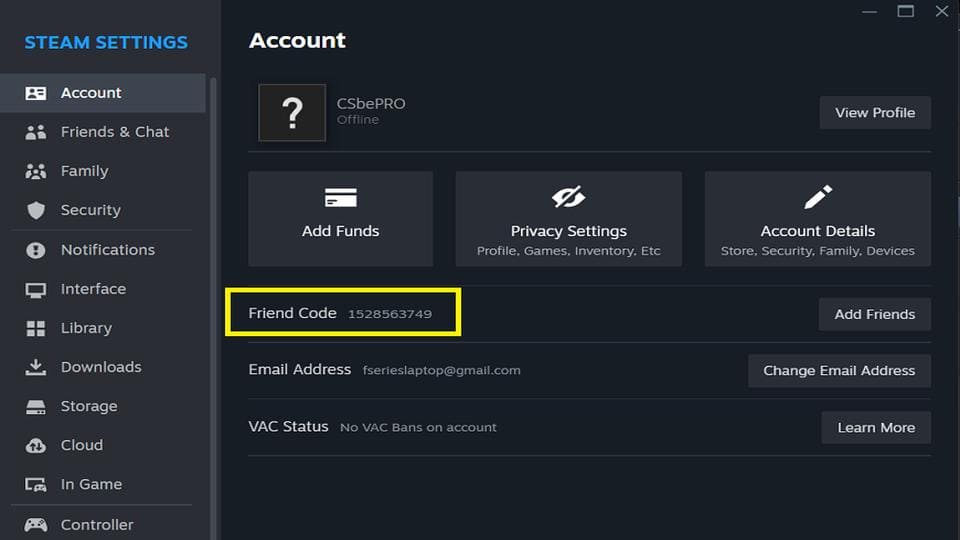
Steam settings panel showing the Friend Code, which matches the SteamID3 value
This Steam client screenshot shows the Friend Code in the Account tab, which corresponds to your SteamID3 in numeric form
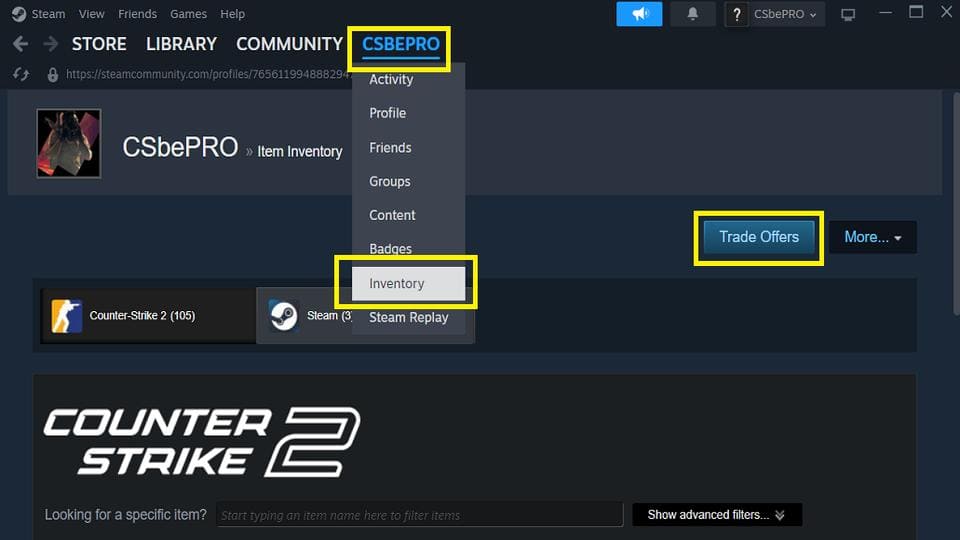
Steam profile menu with Inventory and Trade Offers options highlighted
SteamID3 in the Trade URL

How to Find SteamID64 from Your Steam Profile

The easiest way to find your SteamID64 is through your Steam Community profile. Open Steam, go to your profile, and check the profile URL. If your account does not use a custom URL, the long 17-digit number after /profiles/ is your SteamID64.

Example:

https://steamcommunity.com/profiles/76561190000000000/
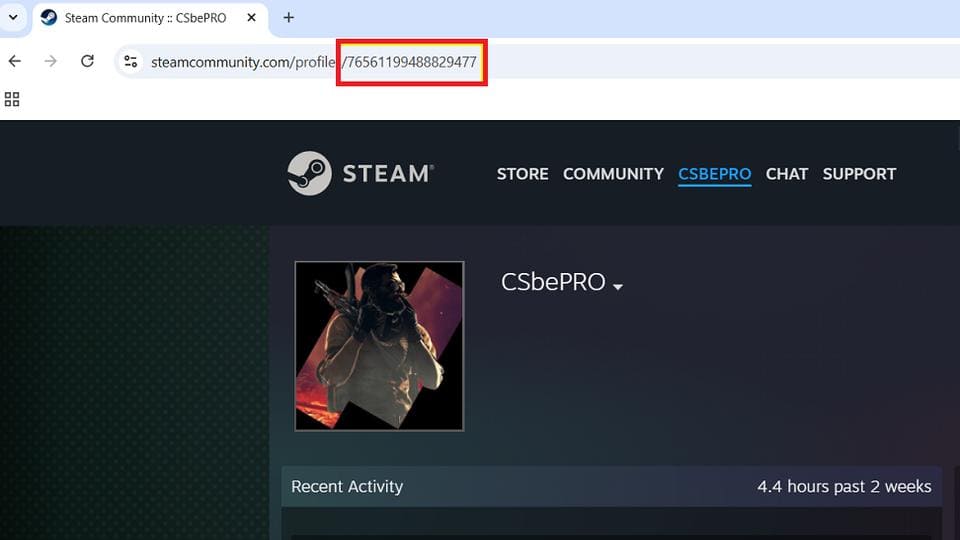
Steam Community profile URL with a highlighted SteamID64
SteamID64 appears directly in your profile URL

If your profile uses a custom URL instead of a numeric profile link, you can copy the profile URL and use a SteamIDs Finder & Converter tool to reveal the SteamID64 behind it.

How to Find AccountID from Your Steam Trade Link

Your Steam trade link contains an AccountID value, often shown after partner= in the URL. This is not the full SteamID3 format, but it is the same account-specific number used inside SteamID3.

Steam Trade Offer URL highlighting the embedded SteamID3 value
SteamID3 inside your trade offer link in the Steam Inventory section

Open Steam, go to your Inventory, then open Trade Offers. On the right side, choose Who can send me Trade Offers? In your personal Trade URL, look for the partner number.

Example:

https://steamcommunity.com/tradeoffer/new/?partner=24691357

That number is your AccountID. In SteamID3 format, it would appear as: [U:1:24691357]

How to Find SteamID3 in the Steam userdata Folder

When you launch a game (e.g, CS2), Steam creates a folder inside the userdata directory for that account.
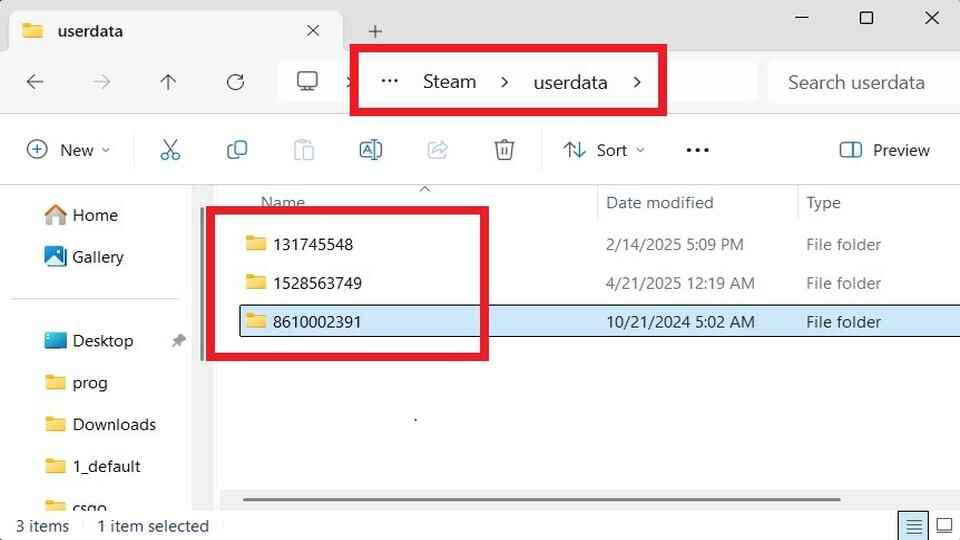
Windows File Explorer open to the Steam userdata folder, showing multiple folders named after different SteamID3 values
SteamID3 is located in the userdata directory inside your Steam installation folder

Each folder inside userdata is usually named after an AccountID. If you use several Steam accounts on the same PC, you may see several folders there, one for each account.

Example:

..\Steam\userdata\24691357\

How to Find SteamID in Counter-Strike 1.6 and Other Older Games

In older games like Counter-Strike 1.6, the classic SteamID format is often shown directly in the server console. Join a server, open the developer console, and type: status

CS 1.6 console status command output listing players and their SteamID values
The CS 1.6 console displaying player Steam IDs through the status command

The output will show player names together with their Steam IDs and connection information. The classic format usually looks like this: STEAM_0:1:12345678

This format is still common in old server logs, admin lists, ban lists, AMX Mod X configs, and legacy Counter-Strike tools.

How to Find SteamID64 in Demo Files

Steam IDs also appear inside demo files. In Counter-Strike 1.6 demos, you may find a value labeled SID near player data, which can point to the player’s SteamID64.

Raw CS 1.6 demo data showing multiple highlighted SteamID64 values next to player entries
A CS 1.6 demo file opened as raw text with several Steam IDs highlighted

CS2 demo files also contain SteamID64 values, but they are not displayed in a simple readable form. They are stored in binary data and little-endian format. You can use my CS2 SteamID Extractor tool to get them.

How to Find SteamID64 in CS2 Console

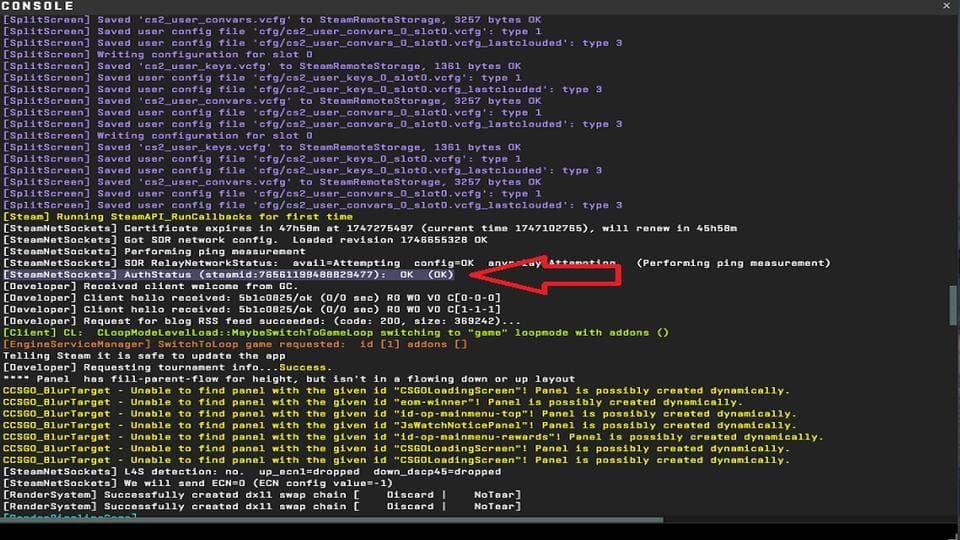
You can also find your SteamID64 through the CS2 console output by launching the game with the -dev launch option.

The -dev launch option works similarly to the developer 1 console command: it enables more detailed developer output in the console. The difference is that -dev is applied when the game starts, so the console can show startup messages that may not appear if you enable developer output only after the game has already loaded.
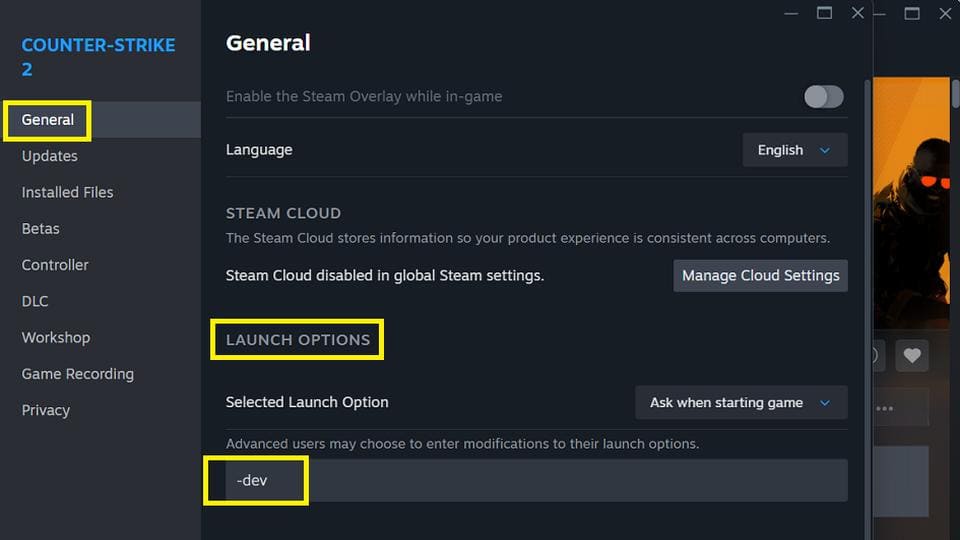
Steam game settings showing the launch option -dev under Counter-Strike 2
Add -dev under launch options in Steam to enable the developer mode
CS2 developer console showing SteamNetSockets and Steam authentication messages, with a red arrow pointing to the auth status line
Counter-Strike 2 console output highlighting the Steam ID64

To use this method, open Steam, right-click Counter-Strike 2, go to Properties, and add -dev to Launch Options (the -console option is not required here). Start the game, open the developer console, and check the startup/output messages. In the console log, you may find your SteamID64 shown as a Steam-related identifier.

Conclusion

Steam IDs are the stable identifiers behind Steam accounts. Profile names, avatars, and custom URLs can change, but SteamID64, SteamID3, AccountID, SteamID, and HEX formats all point back to the same account when converted correctly.

For Counter-Strike players, this often matters for server admin access, ban lists, demo analysis, support checks, trade links, and Steam profile lookup.

SteamID FAQ

A glowing 'FAQ' displayed on a futuristic holographic panel, surrounded by floating question marks and digital circuitry within a cosmic, sci-fi environment
What is a Steam ID?

A Steam ID is a permanent identifier tied to a Steam account.

Is SteamID64 the same as a Steam ID?

SteamID64 is one format of a Steam ID. It is the long 17-digit number often used in Steam Community profile URLs, Steam Web API requests, CS2 tools, and lookup services. The same account can also be represented as SteamID, SteamID3, AccountID, or HEX.

How do I find my SteamID64?

The best way is to open your Steam Community profile and check the URL.

Can I convert SteamID3 to SteamID64?

Yes. SteamID3 contains the AccountID value, which can be converted into SteamID64 by adding 76561197960265728.


Continue Reading

Counter-Strike 2 gameplay view showing FPS counter, frametime, ping, and tick rate overlays with console commands for performance monitoring
How to Show FPS in Counter-Strike 2 | Full 2026 Guide

How to Show FPS in Counter-Strike 2 | Full 2026 Guide Table of Contents Introduction Counter-Strike 2 is one of the most precision-based shooters ever made, where every frame can influence the outcome of a duel. A smooth and consistent frame rate is not just about visuals – it affects

Read More
Leave a Reply

Your email address will not be published. Required fields are marked *